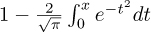
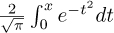
The functionality that the C standard provides is separated into two big parts. One is the proper C language, and the other is the C library. We have looked at several functions that come with the C library, including printf, puts, and strtod, so you should have a good idea what to expect: basic tools that implement features that we need in everyday programming and for which we need clear interfaces and semantics to ensure portability.
On many platforms, the clear specification through an application programming interface (API) also allows us to separate the compiler implementation from the library implementation. For example, on Linux systems, we have a choice of different compilers, most commonly gcc and clang, and different C library implementations, such as the GNU C library (glibc), dietlibc, or musl; potentially, any of these choices can be used to produce an executable.
We will first discuss the general properties and tools of the C library and its interfaces, and then describe some groups of functions: mathematical (numerical) functions, input/output functions, string processing, time handling, access to the runtime environment, and program termination.
Roughly, library functions target one or two purposes:
Write a function my_strtod that implements the functionality of strtod for decimal floating-point constants.
A function like printf can be viewed as targeting both purposes: it can effectively be separated into a formatting phase providing a basic tool and an output phase that is platform specific. There is a function snprintf (explained much later, in section 14.1) that provides the same formatting functionalities as printf but stores the result in a string. This string could then be printed with puts to give the same output as printf as a whole.
In the following chapters, we will discuss the different header files that declare the interfaces of the C library (section 8.1.1), the different types of interfaces it provides (section 8.1.2), the various error strategies it applies (section 8.1.3), an optional series of interfaces intended to improve application safety (section 8.1.4), and tools that we can use to assert platform-specific properties at compile time (section 8.1.5).
The C library has a lot of functions, far more than we can handle in this book. A headerC file bundles interface descriptions for a number of features, mostly functions. The header files that we will discuss here provide features of the C library, but later we can create our own interfaces and collect them in headers (chapter 10).
On this level, we will discuss the functions from the C library that are necessary for basic programming with the elements of the language we have seen so far. We will complete this discussion on higher levels, when we discuss a range of concepts. Table 8.1 has an overview of the standard header files.
Most interfaces in the C library are specified as functions, but implementations are free to choose to implement them as macros, where doing so is appropriate. Compared to those we saw in section 5.6.3, this uses a second form of macros that are syntactically similar to functions, function-like macrosC:
#define putchar(A) putc(A, stdout)
|
Name |
Description |
Section |
|---|---|---|
| <assert.h> | Asserting runtime conditions | 8.7 |
| <complex.h> | Complex numbers | 5.7.7 |
| <ctype.h> | Character classification and conversion | 8.4 |
| <errno.h> | Error codes | 8.1.3 |
| <fenv.h> | Floating-point environment | |
| <float.h> | Properties of floating-point types | 5.7 |
| <inttypes.h> | Formatting conversion of integer types | 5.7.6 |
| <iso646.h> | Alternative spellings for operators | 4.1 |
| <limits.h> | Properties of integer types | 5.1.3 |
| <locale.h> | Internationalization | 8.6 |
| <math.h> | Type-specific mathematical functions | 8.2 |
| <setjmp.h> | Non-local jumps | 17.5 |
| <signal.h> | Signal-handling functions | 17.6 |
| <stdalign.h> | Alignment of objects | 12.7 |
| <stdarg.h> | Functions with varying numbers of arguments | 16.5.2 |
| <stdatomic.h> | Atomic operations | 17.6 |
| <stdbool.h> | Booleans | 3.1 |
| <stddef.h> | Basic types and macros | 5.2 |
| <stdint.h> | Exact-width integer types | 5.7.6 |
| <stdio.h> | Input and output | 8.3 |
| <stdlib.h> | Basic functions | 2 |
| <stdnoreturn.h> | Non-returning functions | 7 |
| <string.h> | String handling | 8.4 |
| <tgmath.h> | Type-generic mathematical functions | 8.2 |
| <threads.h> | Threads and control structures | 18 |
| <time.h> | Handling time | 8.5 |
| <uchar.h> | Unicode characters | 14.3 |
| <wchar.h> | Wide strings | 14.3 |
| <wctype.h> | Wide character classification and conversion | 14.3 |
As before, these are just textual replacements, and since the replacement text may contain a macro argument several times, it would be bad to pass any expression with side effects to such a macro or function. Hopefully, our previous discussion about side effects (takeaway 4.11) has already convinced you not to do that.
Some of the interfaces we will look at have arguments or return values that are pointers. We can’t handle these completely yet, but in most cases we can get away with passing in known pointers or 0 for pointer arguments. Pointers as return values will only occur in situations where they can be interpreted as an error condition.
C library functions usually indicate failure through a special return value. What value indicates the failure can be different and depends on the function itself. Generally, you have to look up the specific convention in the manual page for the functions. Table 8.2 gives a rough overview of the possibilities. There are three categories that apply: a special value that indicates an error, a special value that indicates success, and functions that return some sort of positive counter on success and a negative value on failure.
|
Failure return |
Test |
Typical case |
Example |
|---|---|---|---|
| 0 | !value | Other values are valid | fopen |
| Special error code | value == code | Other values are valid | puts, clock, mktime, strtod, fclose |
| Nonzero value | value | Value otherwise unneeded | fgetpos, fsetpos |
| Special success code | value != code | Case distinction for failure condition | thrd_create |
| Negative value | value < 0 | Positive value is a counter | printf |
Typical error-checking code looks like the following:
if (puts("hello world") == EOF) {
  perror("can't output to terminal:");
  exit(EXIT_FAILURE);
}
Here we see that puts falls into the category of functions that return a special value on error, EOF, “end-of-file.” The perror function from stdio.h is then used to provide an additional diagnostic that depends on the specific error. exit ends the program execution. Don’t wipe failures under the carpet. In programming,
<stdio.h>
Failure is always an option.
Check the return value of library functions for errors.
An immediate failure of the program is often the best way to ensure that bugs are detected and get fixed early in development.
Fail fast, fail early, and fail often.
C has one major state variable that tracks errors of C library functions: a dinosaur called errno. The perror function uses this state under the hood, to provide its diagnostic. If a function fails in a way that allows us to recover, we have to ensure that the error state also is reset; otherwise, the library functions or error checking might get confused:
void puts_safe(char const s[static 1]) {
  static bool failed = false;
  if (!failed && puts(s) == EOF) {
    perror("can't output to terminal:");
    failed = true;
    errno = 0;
  }
}
Many of the functions in the C library are vulnerable to buffer overflowC if they are called with an inconsistent set of parameters. This led (and still leads) to a lot of security bugs and exploits and is generally something that should be handled very carefully.
C11 addressed this sort of problem by deprecating or removing some functions from the standard and by adding an optional series of new interfaces that check consistency of the parameters at runtime. These are the bounds-checking interfaces of Annex K of the C standard. Unlike most other features, this doesn’t come with its own header file but adds interfaces to others. Two macros regulate access to theses interface: __STDC_LIB_EXT1__ tells whether this optional interfaces is supported, and __STDC_WANT_LIB_EXT1__ switches it on. The latter must be set before any header files are included:
#if !__STDC_LIB_EXT1__
# error "This code needs bounds checking interface Annex K"
#endif
#define __STDC_WANT_LIB_EXT1__ 1

#include <stdio.h>

/* Use printf_s from here on. */
This mechanism was (and still is) open to much debate, and therefore Annex K is an optional feature. Many modern platforms have consciously chosen not to support it. There even has been an extensive study by O’Donell and Sebor [2015] that concluded that the introduction of these interfaces has created many more problems than it solved. In the following, such optional features are marked with a gray background.
The bounds-checking functions usually use the suffix _s on the name of the library function they replace, such as printf_s for printf. So you should not use that suffix for code of your own.
Identifier names terminating with _s are reserved.
If such a function encounters an inconsistency, a runtime constraint violationC, it usually should end program execution after printing a diagnostic.
An important goal of programming with a standardized language such as C is portability. We should make as few assumptions about the execution platform as possible and leave it to the C compiler and library to fill in the gaps. Unfortunately, this is not always an option, in which case we should clearly identify code preconditions.
Missed preconditions for the execution platform must abort compilation.
The classic tools to achieve this are preprocessor conditionalsC, as we saw earlier:
#if !__STDC_LIB_EXT1__
# error "This code needs bounds checking interface Annex K"
#endif
As you can see, such a conditional starts with the token sequence # if on a line and terminates with another line containing the sequence # endif. The # error directive in the middle is executed only if the condition (here !__STDC_LIB_EXT1__) is true. It aborts the compilation process with an error message. The conditions that we can place in such a construct are limited.[[Exs 2]]
Write a preprocessor condition that tests whether int has two’s complement sign representation.
Only evaluate macros and integer literals in a preprocessor condition.
As an extra feature in these conditions, identifiers that are unknown evaluate to 0. So, in the previous example, the expression is valid, even if __STDC_LIB_EXT1__ is unknown at that point.
In preprocessor conditions, unknown identifiers evaluate to 0.
If we want to test a more sophisticated condition, _Static_assert (a keyword) and static_assert (a macro from the header assert.h) have a similar effect and are at our disposal:
<assert.h>
#include <assert.h>
static_assert(sizeof(double) == sizeof(long double),
  "Extra precision needed for convergence.");
Mathematical functions come with the math.h header, but it is much simpler to use the type-generic macros that come with tgmath.h. Basically, for all functions, it has a macro that dispatches an invocation such as sin(x) or pow(x, n) to the function that inspects the type of x in its argument and for which the return value is of that same type.
<math.h>
<tgmath.h>
The type-generic macros that are defined are far too many to describe in detail here. Table 8.3 gives an overview of the functions that are provided.
Nowadays, implementations of numerical functions should be high quality, be efficient, and have well-controlled numerical precision. Although any of these functions could be implemented by a programmer with sufficient numerical knowledge, you should not try to replace or circumvent them. Many of them are not just implemented as C functions but also can use processor-specific instructions. For example, processors may have fast approximations of sqrt and sin functions, or implement a floating-point multiply add, fma, in a low-level instruction. In particular, there is a good chance that such low-level instructions are used for all functions that inspect or modify floating-point internals, such as carg, creal, fabs, frexp, ldexp, llround, lround, nearbyint, rint, round, scalbn, and trunc. So, replacing them or reimplementing them in handcrafted code is usually a bad idea.
We have seen some of the IO functions that come with the header file stdio.h: puts and printf. Whereas the second lets you format output in a convenient fashion, the first is more basic: it just outputs a string (its argument) and an end-of-line character.
<stdio.h>
There is an even more basic function than puts: putchar, which outputs a single character. The interfaces of these two functions are as follows:
int putchar(int c);
int puts(char const s[static 1]);
The type int as a parameter for putchar is a historical accident that shouldn’t hurt you much. In contrast to that, having a return type of int is necessary so the function can return errors to its caller. In particular, it returns the argument c if successful and a specific negative value EOF (End Of File) that is guaranteed not to correspond to any character on failure.
With this function, we could actually reimplement puts ourselves:
int puts_manually(char const s[static 1]) {
  for (size_t i = 0; s[i]; ++i) {
    if (putchar(s[i]) == EOF) return EOF;
  }
  if (putchar('\n') == EOF) return EOF;
  return 0;
}
This is just an example; it is probably less efficient than the puts that your platform provides.
Up to now, we have only seen how to output to the terminal. Often, you’ll want to write results to permanent storage, and the type FILE* for streamsC provides an abstraction for this. There are two functions, fputs and fputc, that generalize the idea of unformatted output to streams:
int fputc(int c, FILE* stream);
int fputs(char const s[static 1], FILE* stream);
Here, the * in the FILE* type again indicates that this is a pointer type, and we won’t go into the details. The only thing we need to know for now is that a pointer can be tested whether it is null (takeaway 6.20), so we will be able to test whether a stream is valid.
The identifier FILE represents an opaque typeC, for which we don’t know more than is provided by the functional interfaces that we will see in this chapter. The fact that it is implemented as a macro, and the misuse of the name “FILE” for a stream is a reminder that this is one of the historical interfaces that predate standardization.
Opaque types are specified through functional interfaces.
Don’t rely on implementation details of opaque types.
If we don’t do anything special, two streams are available for output: stdout and stderr. We have already used stdout implicitly: this is what putchar and puts use under the hood, and this stream is usually connected to the terminal. stderr is similar and also is linked to the terminal by default, with perhaps slightly different properties. In any case, these two are closely related. The purpose of having two of them is to be able to distinguish “usual” output (stdout) from “urgent” output (stderr).
We can rewrite the previous functions in terms of the more general ones:
int putchar_manually(int c) {
  return fputc(c, stdout);
}
int puts_manually(char const s[static 1]) {
  if (fputs(s,    stdout) == EOF) return EOF;
  if (fputc('\n', stdout) == EOF) return EOF;
  return 0;
}
Observe that fputs differs from puts in that it doesn’t append an end-of-line character to the string.
puts and fputs differ in their end-of-line handling.
If we want to write output to real files, we have to attach the files to our program execution by means of the function fopen:
FILE* fopen(char const path[static 1], char const mode[static 1]);
FILE* freopen(char const path[static 1], char const mode[static 1],
              FILE *stream);
This can be used as simply as here:
int main(int argc, char* argv[argc+1]) {
 FILE* logfile = fopen("mylog.txt", "a");
 if (!logfile) {
   perror("fopen failed");
   return EXIT_FAILURE;
 }
 fputs("feeling fine today\n", logfile);
 return EXIT_SUCCESS;
}
This opens a fileC called "mylog.txt" in the file system and provides access to it through the variable logfile. The mode argument "a" opens the file for appending: that is, the contents of the file are preserved, if they exist, and writing begins at the current end of that file.
There are multiple reasons why opening a file might not succeed: for example, the file system might be full, or the process might not have permission to write at the indicated place. We check for such an error condition (takeaway 8.2) and exit the program if necessary.
As we have seen, the perror function is used to give a diagnostic of the error that occurred. It is equivalent to something like the following:
fputs("fopen failed: some-diagnostic\n", stderr);
This “some-diagnostic” might (but does not have to) contain more information that helps the user of the program deal with the error.
There are also bounds-checking replacements fopen_s and freopen_s, which ensure that the arguments that are passed are valid pointers. Here, errno_t is a type that comes with stdlib.h and encodes error returns. The restrict keyword that also newly appears only applies to pointer types and is out of our scope for the moment:
errno_t fopen_s(FILE* restrict streamptr[restrict],
                char const filename[restrict], char const mode[restrict
    ]);
errno_t freopen_s(FILE* restrict newstreamptr[restrict],
                  char const filename[restrict], char const mode[
    restrict],
                FILE* restrict stream);
There are different modes to open a file; "a" is only one of several possibilities. Table 8.4 contains an overview of the characters that may appear in that string. Three base modes regulate what happens to a pre-existing file, if any, and where the stream is positioned. In addition, three modifiers can be appended to them. Table 8.5 has a complete list of the possible combinations.
| Mode | Memo | File status after fopen | |
| 'a' | Append | w | File unmodified; position at end |
| 'w' | Write | w | Content of file wiped out, if any |
| 'r' | Read | r | File unmodified; position at start |
| Modifier | Memo | Additional property | |
| '+' | Update | rw | Opens file for reading and writing |
| 'b' | Binary | Views as a binary file; otherwise a text file | |
| 'x' | Exclusive | Creates a file for writing if it does not yet exist |
| "a" | Creates an empty text file if necessary; open for writing at end-of-file |
| "w" | Creates an empty text file or wipes out content; open for writing |
| "r" | Opens an existing text file for reading |
| "a+" | Creates an empty text file if necessary; open for reading and writing at end-of-file |
| "w+" | Creates an empty text file or wipes out content; open for reading and writing |
| "r+" | Opens an existing text file for reading and writing at beginning of file |
"ab" "rb" "wb" "a+b" "ab+" "r+b" "rb+" "w+b" "wb+" |
Same as above, but for a binary file instead of a text file |
| "wx" "w+x" "wbx" "w+bx" "wb+x" | Same as above, but error if the file exists prior to the call |
These tables show that a stream can be opened not only for writing but also for reading; we will see shortly how that can be done. To know which of the base modes opens for reading or writing, just use your common sense. For 'a' and 'w', a file that is positioned at its end can’t be read, since there is nothing there; thus these open for writing. For 'r', file content that is preserved and positioned at the beginning should not be overwritten accidentally, so this is for reading.
The modifiers are used less commonly in everyday coding. “Update” mode with '+' should be used carefully. Reading and writing at the same time is not easy and needs some special care. For 'b', we will discuss the difference between text and binary streams in more detail in section 14.4.
There are three other principal interfaces to handle streams, freopen, fclose, and fflush:
int fclose(FILE* fp);
int fflush(FILE* stream);
The primary uses for freopen and fclose are straightforward: freopen can associate a given stream to a different file and eventually change the mode. This is particularly useful to associate the standard streams to a file. E.g our little program from above could be rewritten as
int main(int argc, char* argv[argc+1]) {
 if (!freopen("mylog.txt", "a", stdout)) {
   perror("freopen failed");
   return EXIT_FAILURE;
 }
 puts("feeling fine today");
 return EXIT_SUCCESS;
}
Output to text streams is usually bufferedC: that is, to make more efficient use of its resources, the IO system can delay the physical write of to a stream. If we close the stream with fclose, all buffers are guaranteed to be flushedC to where it is supposed to go. The function fflush is needed in places where we want to see output immediately on the terminal, or where we don’t want to close the file yet but want to ensure that all content we have written has properly reached its destination. Listing 8.1 shows an example that writes 10 dots to stdout with a delay of approximately one second between all writes.[[Exs 3]]
Observe the behavior of the program by running it with zero, one, and two command-line arguments.
 1   #include <stdio.h>
 2
 3   /* delay execution with some crude code,
 4      should use thrd_sleep, once we have that*/
 5   void delay(double secs) {
 6     double const magic = 4E8;   // works just on my machine
 7     unsigned long long const nano = secs* magic;
 8     for (unsigned long volatile count = 0;
 9          count < nano;
10          ++count) {
11       /* nothing here */
12     }
13   }
14
15   int main(int argc, char* argv[argc+1]) {
16     fputs("waiting 10 seconds for you to stop me", stdout);
17     if (argc < 3) fflush(stdout);
18     for (unsigned i = 0; i < 10; ++i) {
19       fputc('.', stdout);
20       if (argc < 2) fflush(stdout);
21       delay(1.0);
22     }
23     fputs("\n", stdout);
24     fputs("You did ignore me, so bye bye\n", stdout);
25   }
The most common form of IO buffering for text files is line bufferingC. In that mode, output is only physically written if the end of a text line is encountered. So usually, text that is written with puts appears immediately on the terminal; fputs waits until it encounters an '\n' in the output. Another interesting thing about text streams and files is that there is no one-to-one correspondence between characters that are written in the program and bytes that land on the console device or in the file.
Text input and output converts data.
This is because internal and external representations of text characters are not necessarily the same. Unfortunately, there are still many different character encodings; the C library is in charge of doing the conversions correctly, if it can. Most notoriously, the end-of-line encoding in files is platform dependent:
There are three commonly used conversions to encode end-of-line.
C gives us a very suitable abstraction in using '\n' for this, regardless of the platform. Another modification you should be aware of when doing text IO is that white space that precedes the end of line may be suppressed. Therefore, the presence of trailing white spaceC such as blank or tabulator characters cannot be relied upon and should be avoided:
Text lines should not contain trailing white space.
The C library additionally also has very limited support for manipulating files within the file system:
int remove(char const pathname[static 1]);
int rename(char const oldpath[static 1], char const newpath[static 1]);
These basically do what their names indicate.
| FF | Flags | Special form of conversion |
| WW | Field width | minimum width |
| PP | Precision | |
| LL | Modifier | Select width of type |
| SS | Specifier | Select conversion |
We have covered how to use printf for formatted output. The function fprintf is very similar to that, but it has an additional parameter that allows us to specify the stream to which the output is written:
int printf(char const format[static 1], ...);
int fprintf(FILE* stream, char const format[static 1], ...);
The syntax with the three dots ... indicates that these functions may receive an arbitrary number of items that are to be printed. An important constraint is that this number must correspond exactly to the '%' specifiers; otherwise the behavior is undefined:
Parameters of printf must exactly correspond to the format specifiers.
With the syntax %[FF][WW][.PP][LL]SS, a complete format specification can be composed of five parts: flags, width, precision, modifiers, and specifier. See table 8.6 for details.
The specifier is not optional and selects the type of output conversion that is performed. See table 8.7 for an overview.
As you can see, for most types of values, there is a choice of format. You should chose the one that is most appropriate for the meaning of the value that the output is to convey. For all numerical values, this should usually be a decimal format.