We’ve already made use of some simple examples of expressionsC. These are code snippets that compute a value based on other values. The simplest such expressions are arithmetic expressions, which are similar to those we learned in school. But there are others, notably comparison operators such as == and !=, which we saw earlier.
In this chapter, the values and objects on which we will do these computations will be mostly of the type size_t, which we have already met. Such values correspond to “sizes,” so they are numbers that cannot be negative. Their range of possible values starts at 0. What we would like to represent are all the non-negative integers, often denoted as N, N0, or “natural” numbers in mathematics. Unfortunately, computers are finite, so we can’t directly represent all the natural numbers, but we can do a reasonable approximation. There is a big upper limit SIZE_MAX that is the upper bound of what we can represent in a size_t.
The type size_t represents values in the range [0, SIZE_MAX].
The value of SIZE_MAX is quite large. Depending on the platform, it is one of
The first value is a minimal requirement; nowadays, such a small value would only occur on some embedded platforms. The other two values are much more commonly used today: the second is still found on some PCs and laptops, and the large majority of newer platforms have the third. Such a choice of value is large enough for calculations that are not too sophisticated. The standard header stdint.h provides SIZE_MAX such that you don’t have to figure out that value yourself, and such that you do not have to specialize your program accordingly.
<stdint.h>
The concept of “numbers that cannot be negative” to which we referred for size_t corresponds to what C calls unsigned integer typesC. Symbols and combinations like + and != are called operatorsC, and the things to which they are applied are called operandsC; so, in something like a + b, + is the operator and a and b are its operands.
For an overview of all C operators, see the following tables: table 4.1 lists the operators that operate on values, table 4.2 lists those that operate on objects, and table 4.3 lists those that operate on types. To work with these, you may have to jump from one table to another. For example, if you want to work out an expression such as a + 5, where a is some variable of type unsigned, you first have to go to the third line in table 4.2 to see that a is evaluated. Then, you can use the third line in table 4.1 to deduce that the value of a and 5 are combined in an arithmetic operation: a +. Don’t be frustrated if you don’t understand everything in these tables. A lot of the concepts that are mentioned have not yet been introduced; they are listed here to form a reference for the entire book.
|
Operator |
Nick |
Form |
Type |
Result |
|
|---|---|---|---|---|---|
| o | Array* | Pointer | Array decay | ||
| o | Function | Pointer | Function decay | ||
| o | Other | Value | Evaluation | ||
| = | o@a | Non-array | Value | Assignment | |
| += -= *= /= | o@a | Arithmetic | Value | Arithmetic | |
| += -= | o@a | Pointer | Value | Arithmetic | |
| %= | o@a | Integer | Value | Arithmetic | |
| ++ -- | @o o@ | Arithmetic or pointer | Value | Arithmetic | |
| &= | and_eq | o@a | Integer | Value | Bit |
| |= | or_eq | ||||
| ^= | xor_eq | ||||
| <<= >>= | o@a | Integer | Value | Bit | |
| . | o@m | struct | Object | Member | |
| [] | o[a] | Array* | Object | Member | |
| & | @o | Any* | Pointer | Address | |
| sizeof | @ o | Data Object, non-VLA | size_t | Size, ICE | |
| sizeof | @ o | VLA | size_t | size | |
| _Alignof | alignof | @(o) | Non-function | size_t | Alignment, ICE |
|
Nick |
Form |
Type of T |
||
|---|---|---|---|---|
| sizeof | sizeof(T) | Any | Size | |
| _Alignof | alignof | _Alignof(T) | Any | Alignment |
| offsetof | offsetof(T,m) | struct | Member offset |
Arithmetic operators form the first group in table 4.1 of operators that operate on values.
The arithmetic operators +, -, and * mostly work as we would expect by computing the sum, the difference, and the product, respectively, of two values:
   size_t a = 45;
   size_t b = 7;
   size_t c = (a - b)*2;
   size_t d = a - b*2;
Here, c must be equal to 76, and d to 31. As you can see from this little example, subexpressions can be grouped together with parentheses to enforce a preferred binding of the operator.
In addition, the operators + and - have unary variants. -b gives the negative of b: a value a such that b + a is 0. +a simply provides the value of a. The following gives 76 as well:
size_t c = (+a + -b)*2;
Even though we use an unsigned type for our computation, negation and difference by means of the operator - are well definedC. That is, regardless of the values we feed into such a subtraction, our computation will always have a valid result. In fact, one of the miraculous properties of size_t is that +-* arithmetic always works where it can. As long as the final mathematical result is within the range [0, SIZE_MAX], then that result will be the value of the expression.
Unsigned arithmetic is always well defined.
The operations +, -, and * on size_t provide the mathematically correct result if it is representable as a size_t.
When the result is not in that range and thus is not representableC as a size_t value, we speak of arithmetic overflowC. Overflow can happen, for example, if we multiply two values that are so large that their mathematical product is greater than SIZE_MAX. We’ll look how C deals with overflow in the next chapter.
The operators / and % are a bit more complicated, because they correspond to integer division and the remainder operation. You might not be as used to them as you are to the other three arithmetic operators. a/b evaluates to the number of times b fits into a, and a%b is the remaining value once the maximum number of bs are removed from a. The operators / and % come in pairs: if we have z = a / b, the remainder a % b can be computed as a - z*b:
For unsigned values, a == (a/b)*b + (a%b).
A familiar example for the % operator is the hours on a clock. Say we have a 12-hour clock: 6 hours after 8:00 is 2:00. Most people are able to compute time differences on 12-hour or 24-hour clocks. This computation corresponds to a % 12: in our example, (8 + 6) % 12 == 2.[[Exs 1]] Another similar use for % is computation using minutes in an hour, of the form a % 60.
Implement some computations using a 24-hour clock, such as 3 hours after 10:00 and 8 hours after 20:00.
There is only one value that is not allowed for these two operations: 0. Division by zero is forbidden.
Unsigned / and % are well defined only if the second operand is not 0.
The % operator can also be used to explain additive and multiplicative arithmetic on unsigned types a bit better. As already mentioned, when an unsigned type is given a value outside its range, it is said to overflowC. In that case, the result is reduced as if the % operator had been used. The resulting value “wraps around” the range of the type. In the case of size_t, the range is 0 to SIZE_MAX, and therefore
Arithmetic on size_t implicitly does the computation %(SIZE_MAX+1).
In the case of overflow, unsigned arithmetic wraps around.
This means for size_t values, SIZE_MAX + 1 is equal to 0, and 0 - 1 is equal to SIZE_MAX.
This “wrapping around” is the magic that makes the - operators work for unsigned types. For example, the value -1 interpreted as a size_t is equal to SIZE_MAX; so adding -1 to a value a just evaluates to a + SIZE_MAX, which wraps around to
The operators / and % have the nice property that their results are always smaller than or equal to their operands:
The result of unsigned / and % is always smaller than the operands.
And thus
Unsigned / and % can’t overflow.
Another important operation that we have already seen is assignment: a = 42. As you can see from that example, this operator is not symmetric: it has a value on the right and an object on the left. In a freaky abuse of language, C jargon often refers to the right side as rvalueC (right value) and to the object on the left as lvalueC (left value). We will try to avoid that vocabulary whenever we can: speaking of a value and an object is sufficient.
C has other assignment operators. For any binary operator @, the five we have seen all have the syntax
an_object @= some_expression;
They are just convenient abbreviations for combining the arithmetic operator @ and assignment; see table 4.2. A mostly equivalent form is
an_object = (an_object @ (some_expression));
In other words, there are operators +=, -=, *=, /=, and %=. For example, in a for loop, the operator += can be used:
   for (size_t i = 0; i < 25; i += 7) {
     ...
   }
The syntax of these operators is a bit picky. You aren’t allowed to have blanks between the different characters: for example, i + = 7 instead of i += 7 is a syntax error.
Operators must have all their characters directly attached to each other.
We already have seen two other operators that modify objects: the increment operatorC ++ and the decrement operatorC --:
All these assignment operators are real operators. They return a value (but not an object!): the value of the object after the modification. You could, if you were crazy enough, write something like
   a = b = c += ++d;
   a = (b = (c += (++d))); // Same
But such combinations of modifications to several objects in one go is generally frowned upon. Don’t do that unless you want to obfuscate your code. Such changes to objects that are involved in an expression are referred to as side effectsC.
Side effects in value expressions are evil.
Never modify more than one object in a statement.
For the increment and decrement operators, there are even two other forms: postfix incrementC and postfix decrementC. They differ from the one we have seen, in the result they provide to the surrounding expression. The prefix versions of these operators (++a and --a) do the operation first and then return the result, much like the corresponding assignment operators (a+=1 and a-=1); the postfix operations return the value before the operation and perform the modification of the object thereafter. For any of them, the effect on the variable is the same: the incremented or decremented value.
All this shows that evaluation of expressions with side effects may be difficult to follow. Don’t do it.
Several operators yield a value 0 or 1, depending on whether some condition is verified; see table 4.1. They can be grouped in two categories: comparisons and logical evaluation.
In our examples, we already have seen the comparison operators ==, !=, <, and >. Whereas the latter two perform strict comparisons between their operands, the operators <= and >= perform “less than or equal” and “greater than or equal” comparisons, respectively. All these operators can be used in control statements, as we have already seen, but they are actually more powerful than that.
Comparison operators return the value false or true.
Remember that false and true are nothing more than fancy names for 0 and 1, respectively. So, they can be used in arithmetic or for array indexing. In the following code, c will always be 1, and d will be 1 if a and b are equal and 0 otherwise:
   size_t c = (a < b) + (a == b) + (a > b);
   size_t d = (a <= b) + (a >= b) - 1;
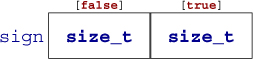
In the next example, the array element sign[false] will hold the number of values in largeA that are greater than or equal to 1.0 and sign[true] those that are strictly less:
   double largeA[N] = { 0 };
   ...
   /* Fill largeA somehow */

   size_t sign[2] = { 0, 0 };
   for (size_t i = 0; i < N; ++i) {
       sign[(largeA[i] < 1.0)] += 1;
   }
Finally, there also is an identifier not_eq that may be used as a replacement for !=. This feature is rarely used. It dates back to the times where some characters were not properly present on all computer platforms. To be able to use it, you’d have to include the file iso646.h.
<iso646.h>
Logic operators operate on values that are already supposed to represent a false or true value. If they do not, the rules described for conditional execution (takeaway 3.1) apply first. The operator ! (not) logically negates its operand, operator && (and) is logical and, and operator || (or) is logical or. The results of these operators are summarized in table 4.4.
|
a |
not a |
a and b |
false |
true |
a or b |
false |
true |
|---|---|---|---|---|---|---|---|
| false | true | false | false | false | false | false | true |
| true | false | true | false | true | true | true | true |
Similar to the comparison operators,
Logic operators return the value false or true.
Again, remember that these values are nothing more than 0 and 1 and can thus be used as indices:
double largeA[N] = { 0 };
...
/* Fill largeA somehow */

size_t isset[2] = { 0, 0 };
for (size_t i = 0; i < N; ++i) {
  isset[!!largeA[i]] += 1;
}
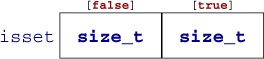
Here, the expression !!largeA[i] applies the ! operator twice and thus just ensures that largeA[i] is evaluated as a truth value (takeaway 3.4). As a result, the array elements isset[0] and isset[1] will hold the number of values that are equal to 0.0 and unequal, respectively.
The operators && and || have a particular property called short-circuit evaluationC. This barbaric term denotes the fact that the evaluation of the second operand is omitted if it is not necessary for the result of the operation:
// This never divides by 0.
if (b != 0 && ((a/b) > 1)) {
  ++x;
}
Here, the evaluation of a/b is omitted conditionally during execution, and thereby a division by zero can never occur. Equivalent code would be
if (b) {
  // This never divides by 0.
  if (a/b > 1) {
    ++x;
  }
}
The ternary operator is similar to an if statement, but it is an expression that returns the value of the chosen branch:
   size_t size_min(size_t a, size_t b) {
     return (a < b) ? a : b;
   }
Similar to the operators && and ||, the second and third operand are evaluated only if they are really needed. The macro sqrt from tgmath.h computes the square root of a non-negative value. Calling it with a negative value raises a domain errorC:
<tgmath.h>
#include <tgmath.h>

#ifdef __STDC_NO_COMPLEX__
# error "we need complex arithmetic"
#endif

double complex sqrt_real(double x) {
  return (x < 0) ? CMPLX(0, sqrt(-x)) : CMPLX(sqrt(x), 0);
}
In this function, sqrt is called only once, and the argument to that call is never negative. So, sqrt_real is always well behaved; no bad values are ever passed to sqrt.
Complex arithmetic and the tools used for it require the header complex.h, which is indirectly included by tgmath.h. They will be introduced later, in section 5.7.7.
<complex.h>
<tgmath.h>
In the previous example, we also see conditional compilation that is achieved with preprocessor directivesC. The #ifdef construct ensures that we hit the #error condition only if the macro __STDC_NO_COMPLEX__ is defined.
Of the operators so far, we have seen that &&, ||, and ?: condition the evaluation of some of their operands. This implies in particular that for these operators, there is an evaluation order for the operands: the first operand, since it is a condition for the remaining ones, is always evaluated first:
&&, ||, ?:, and , evaluate their first operand first.
The comma (,) is the only operator we haven’t introduced yet. It evaluates its operands in order, and the result is the value of the right operand. For example, (f(a), f(b)) first evaluates f(a) and then f(b); the result is the value of f(b). Be aware that the comma character plays other syntactical roles in C that do not use the same convention about evaluation. For example, the commas that separate initializations do not have the same properties as those that separate function arguments.
The comma operator is rarely useful in clean code, and it is a trap for beginners: A[i, j] is not a two-dimensional index for matrix A, but results in A[j].
Don’t use the , operator.
Other operators don’t have an evaluation restriction. For example, in an expression such as f(a)+g(b), there is no pre-established order specifying whether f(a) or g(b) is to be computed first. If either the function f or g works with side effects (for instance, if f modifies b behind the scenes), the outcome of the expression will depend on the chosen order.
Most operators don’t sequence their operands.
That order may depend on your compiler, on the particular version of that compiler, on compile-time options, or just on the code that surrounds the expression. Don’t rely on any such particular sequencing: it will bite you.
The same holds for function arguments. In something like
printf("%g and %g\n", f(a), f(b));
we wouldn’t know which of the last two arguments is evaluated first.
Function calls don’t sequence their argument expressions.
The only reliable way not to depend on evaluation ordering of arithmetic expressions is to ban side effects:
Functions that are called inside expressions should not have side effects.
The Union-Find problem deals with the representation of partitions over a base set. We will identify the elements of the base set using the numbers 0, 1, ... and will represent partitions with a forest data structure where each element has a “parent” that is another element inside the same partition. Each set in such a partition is identified by a designated element called the root of the set.
We want to perform two principal operations:
C also has a concept called a union, which we will see later, and which is completely different than the operation we are currently talking about. Because union is a keyword, we use capital letters to name the operations here.
Can you implement a forest data structure in an index table of base type size_t called parent? Here, a value in the table SIZE_MAX would mean a position represents a root of one of the trees; another number represents position of the parent of the corresponding tree. One of the important features to start the implementation is an initialization function that makes parent the singleton partition: that is, the partition where each element is the root of its own private set.
With this index table, can you implement a Find function that, for a given index, finds the root of its tree?
Can you implement a FindReplace function that changes all parent entries on a path to the root (including) to a specific value?
Can you implement a FindCompress function that changes all parent entries to the root that has been found?
Can you implement a Union function that, for two given elements, combines their trees into one? Use FindCompress for one side and FindReplace for the other.