Chapter 10. Organization and documentation
This chapter covers
- How to document interfaces
- How to explain implementations
Being an important societal, cultural, and economic activity, programming needs a certain form of organization to be successful.
As with coding style, beginners tend to underestimate the effort that should be put into code and project organization and
documentation: unfortunately, many of us have to go through the experience of reading our own code some time after we wrote
it, and not having any clue what it was all about.
Documenting or, more generally, explaining program code is not an easy task. We have to find the right balance between providing
context and necessary information and boringly stating the obvious. Let’s have a look at the two following lines:
1      u = fun4you(u, i, 33, 28);  // ;)
2      ++i;                        // incrementing i
The first line isn’t good, because it uses magic constants, a function name that doesn’t tell what is going on, and a variable
name that does not have much meaning, at least to me. The smiley comment indicates that the programmer had fun when writing
this, but it is not very helpful to the casual reader or maintainer.
In the second line, the comment is superfluous and states what any even not-so-experienced programmer knows about the ++ operator.
Compare this to the following:
1   /* 33 and 28 are suitable because they are coprime. */
2   u = nextApprox(u, i, 33, 28);
3   /* Theorem 3 ensures that we may move to the next step. */
4   ++i;
Here we may deduce a lot more. I’d expect u to be a floating-point value, probably double: that is, subject to an approximation procedure. That procedure runs in steps, indexed by i, and needs some additional arguments that are subject to a primality condition.
Generally, we have the what, what for, how, and in which manner rules, in order of their importance:
Takeaway 10.1 (what)
Function interfaces describe what is done.
Takeaway 10.2 (what for)
Interface comments document the purpose of a function.
Takeaway 10.3 (how)
Function code tells how the function is organized.
Takeaway 10.4 (in which manner)
Code comments explain the manner in which function details are implemented.
In fact, if you think of a larger library project that is used by others, you’d expect that all users will read the interface
specification (such as in the synopsis part of a man page), and most of them will read the explanation about these interfaces (the rest of the man page). Much fewer of them will look at the source code and read about how or in which manner a particular interface implementation does things the way it does them.
A first consequence of these rules is that code structure and documentation go hand in hand. The distinction between interface
specification and implementation is expecially important.
Takeaway 10.5
Separate interface and implementation.
This rule is reflected in the use of two different kinds of C source files: header filesC, usually ending with ".h"; and translation unitsC (TU), ending with ".c".
Syntactical comments have two distinct roles in those two kinds of source files that should be separated:
Takeaway 10.6
Document the interface—explain the implementation.
10.1. Interface documentation
In contrast to more recent languages such as Java and Perl, C has no “built-in” documentation standard. But in recent years,
a cross-platform public domain tool has been widely adopted in many projects: doxygen (http://www.doxygen.nl/). It can be used to automatically produce web pages, PDF manuals, dependency graphs, and a lot more. But even if you don’t
use doxygen or another equivalent tool, you should use its syntax to document interfaces.
Takeaway 10.7
Document interfaces thoroughly.
Doxygen has a lot of categories that help with that, but an extended discussion goes far beyond the scope of this book. Just
consider the following example:
heron_k.h
116 /**
117 ** @brief use the Heron process to approximate @a a to the
118 ** power of  1/k
119 **
120 ** Or in other words this computes the @f$k^{th}@f$ root of @a a.
121 ** As a special feature, if @a k is -1 it computes the
122 ** multiplicative inverse of @a a.
123 **
124 ** @param a must be greater than 0.0
125 ** @param k should not be 0 and otherwise be between
126 ** DBL_MIN_EXP*FLT_RDXRDX and
127 ** DBL_MAX_EXP*FLT_RDXRDX.
128 **
129 ** @see FLT_RDXRDX
130 **/
131 double heron(double a, signed k);
1/k
119 **
120 ** Or in other words this computes the @f$k^{th}@f$ root of @a a.
121 ** As a special feature, if @a k is -1 it computes the
122 ** multiplicative inverse of @a a.
123 **
124 ** @param a must be greater than 0.0
125 ** @param k should not be 0 and otherwise be between
126 ** DBL_MIN_EXP*FLT_RDXRDX and
127 ** DBL_MAX_EXP*FLT_RDXRDX.
128 **
129 ** @see FLT_RDXRDX
130 **/
131 double heron(double a, signed k);
Doxygen produces online documentation for that function that looks similar to figure 10.1 and also is able to produce formatted text that we can include in this book:
heron_k.h
heron: use the Heron process to approximate a to the power of 1/k
Or in other words this computes the kth root of a. As a special feature, if k is -1 it computes the multiplicative inverse of a.
Parameters:
| a |
must be greater than 0.0 |
| k |
should |
not |
be |
0 |
and |
otherwise |
be |
between |
| |
DBL_MIN_EXP*FLT_RDXRDX and DBL_MAX_EXP*FLT_RDXRDX.
|
See also: FLT_RDXRDX
double heron(double a, signed k);
heron_k.h
FLT_RDXRDX: the radix base 2 of FLT_RADIX
This is needed internally for some of the code below.
# define FLT_RDXRDX something
Figure 10.1. Documentation produced by doxygen
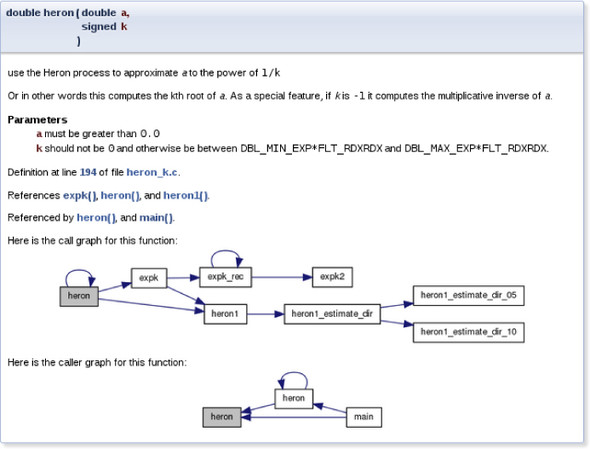
As you have probably guessed, words starting with @ have a special meaning for doxygen: they start its keywords. Here we have @param, @a, and @brief. The first documents a function parameter, the second refers to such a parameter in the rest of the documentation, and the
last provides a brief synopsis of the function.
Additionally, we see that there is some markup capacity inside comments, and also that doxygen was able to identify the place
in translation unit "heron_k.c" that defines the function and the call graph of the different functions involved in the implementation.
To provide good project organization, it is important that users of your code be able to easily find connected pieces and
not have to search all over the place.
Takeaway 10.8
Structure your code in units that have strong semantic connections.
Most often, this is simply done by grouping all functions that treat a specific data type in one header file. A typical header
file "brian.h" for struct brian would be like this:
 1   #ifndef BRIAN_H
 2   #define BRIAN_H 1
 3   #include <time.h>
 4
 5   /** @file
 6    ** @brief Following Brian the Jay
 7    **/
 8
 9   typedef struct brian brian;
10   enum chap { sct, en, };
11   typedef enum chap chap;
12
13   struct brian {
14     struct timespec ts; /**< point in time */
15     unsigned counter;   /**< wealth        */
16      chap masterof;     /**< occupation    */
17   };
18
19   /**
20    ** @brief get the data for the next point in time
21    **/
22   brian brian_next(brian);
23
24   ...
25   #endif
That file comprises all the interfaces that are necessary to use the struct. It also includes other header files that might be needed to compile these interfaces and protect against multiple inclusion
with include guardsC, here the macro BRIAN_H.
10.2. Implementation
If you read code that is written by good programmers (and you should do that often!), you’ll notice that it is often scarcely
commented. Nevertheless, it may be quite readable, provided the reader has basic knowledge of the C language. Good programming
only needs to explain the ideas and prerequisites that are not obvious (the difficult part). The structure of the code shows what it does and how.
Takeaway 10.9
Implement literally.
A C program is a descriptive text about what is to be done. The rules for naming entities that we introduced earlier play
a crucial role in making that descriptive text readable and clear. Another requirement is to have an obvious flow of control
through visually clearly distinctive structuring in {} blocks that are linked together with comprehensive control statements.
Takeaway 10.10
Control flow must be obvious.
There are many possibilities to obfuscate control flow. The most important are as follows:
- Buried jumps: – break, continue, return, and goto[1] statements that are buried in a complicated nested structure of if or switch statements, eventually combined with loop structures.
1
- Flyspeck expressions: – Controlling expressions that combine a lot of operators in an unusual way (for example, !!++*p-- or a --> 0) such that they must be examined with a magnifying glass to understand where the control flow goes from here.
In the following section, we will focus on two concepts that can be crucial for readability and performance of C code. A macro can be a convenient tool to abbreviate a certain feature, but, if used carelessly, may also obfuscate code that uses it and
trigger subtle bugs (section 10.2.1). As we saw previously, functions are the primary choice in C for modularization. Here, a particular property of some functions
is especially important: a function that is pure only interacts with the rest of the program via its interface. Thereby, pure functions are easily understandable by humans and
compilers and generally lead to quite efficient implementations (section 10.2.2).
10.2.1. Macros
We already know one tool that can be abused to obfuscate control flow: macros. As you hopefully remember from sections 5.6.3 and 8.1.2, macros define textual replacements that can contain almost any C text. Because of the problems we will illustrate here,
many projects ban macros completely. This is not the direction the evolution of the C standard goes, though. As we have seen,
for example, type-generic macros are the modern interface to mathematical functions (see 8.2); macros should be used for initialization constants (section 5.6.3) or used to implement compiler magic (errno, section 8.1.3).
So instead of denying it, we should try to tame the beast and set up some simple rules that confine the possible damage.
Takeaway 10.11
Macros should not change control flow in a surprising way.
Notorious examples that pop up in discussion with beginners from time to time are things like these:
 1   #define begin {
 2   #define end }
 3   #define forever for (;;)
 4   #define ERRORCHECK(CODE) if (CODE) return -1
 5
 6   forever
 7     begin
 8     // do something
 9     ERRORCHECK(x);
10     end
Don’t do that. The visual habits of C programmers and our tools don’t easily work with something like that, and if you use
such things in complicated code, they will almost certainly go wrong.
Here, the ERRORCHECK macro is particularly dangerous. Its name doesn’t suggest that a nonlocal jump such as a return might be hidden in there. And its implementation is even more dangerous. Consider the following two lines:
1   if (a) ERRORCHECK(x);
2   else puts("a is 0!");
These lines are rewritten as
1   if (a) if (x) return -1;
2   else puts("a is 0!");
The else-clause (a so-called dangling elseC) is attached to the innermost if, which we don’t see. So this is equivalent to
1   if (a) {
2     if (x) return -1;
3     else puts("a is 0!");
4   }
which is probably quite surprising to the casual reader.
This doesn’t mean control structures shouldn’t be used in macros at all. They just should not be hidden and should have no
surprising effects. This macro by itself is probably not as obvious, but its use has no surprises:
1   #define ERROR_RETURN(CODE) \
2   do {                       \
3     if (CODE) return -1;     \
4   } while (false)
The name of the following macro makes it explicit that there might be a return. The dangling else problem is handled by the replaced text:
1   if (a) ERROR_RETURN(x);
2   else puts("a is 0!");
The next example structures the code as expected, with the else associated with the first if:
1   if (a) do {
2     if (CODE) return -1;
3   } while (false);
4   else puts("a is 0!");
The do-while(false)-trick is obviously ugly, and you shouldn’t abuse it. But it is a standard trick to surround one or several statements with
a {} block without changing the block structure that is visible to the naked eye.
Takeaway 10.12
Function-like macros should syntactically behave like function calls.
Possible pitfalls are:
- if without else: Already demonstrated.
- Trailing semicolons: These can terminate an external control structure in a surprising way.
- Comma operators: The comma is an ambiguous fellow in C. In most contexts, it is used as a list separator, such as for function calls, enumerator
declarations, or initializers. In the context of expressions, it is a control operator. Avoid it.
- Continuable expressions: Expressions that will bind to operators in an unexpected way when put into a nontrivial context.[[Exs 1]] In the replacement text, put parentheses around parameters and expressions.
[Exs 1]
Consider a macro sum(a, b) that is implemented as a+b. What is the result of sum(5, 2)*7?
- Multiple evaluation: Macros are textual replacements. If a macro parameter is used twice (or more), its effects are done twice.[[Exs 2]]
[Exs 2]
Let max(a, b) be implemented as ((a) < (b) ? (b) : (a)). What happens for max(i++, 5)?
10.2.2. Pure functions
Functions in C such as size_min (section 4.4) and gcd (section 7.3), which we declared ourselves, have a limit in terms of what we are able to express: they don’t operate on objects but rather
on values. In a sense, they are extensions of the value operators in table 4.1 and not of the object operators in table 4.2.
Takeaway 10.13
Function parameters are passed by value.
That is, when we call a function, all parameters are evaluated, and the parameters (variables that are local to the function)
receive the resulting values as initialization. The function then does whatever it has to do and sends back the result of
its computation through the return value.
For the moment, the only possibility that we have for two functions to manipulate the same object is to declare an object such that the declaration is visible to both functions. Such global variablesC have a lot of disadvantages: they make code inflexible (the object to operate on is fixed), are difficult to predict (the
places of modification are scattered all over), and are difficult to maintain.
Takeaway 10.14
Global variables are frowned upon.
A function with the following two properties is called pureC:
- The function has no effects other than returning a value.
- The function return value only depends on its parameters.
The only interest in the execution of a pure function is its result, and that result only depends on the arguments that are
passed. From the point of view of optimization, pure functions can be moved around or even executed in parallel to other tasks.
Execution can start at any point when its parameters are available and must be finished before the result is used.
Effects that would disqualify a function from being pure would be all those that change the abstract state machine other than
by providing the return value. For example,
- The function reads part of the program’s changeable state by means other than through its arguments.
- The function modifies a global object.
- The function keeps a persistent internal state between calls.[2]
2
Persistent state between calls to the same function can be established with local
static variables. We will see this concept in
section 13.2.
- The function does IO.[3]
3
Such an IO would occur, for example, by using printf.
Pure functions are a very good model for functions that perform small tasks, but they are pretty limited once we have to perform
more complex ones. On the other hand, optimizers love pure functions, since their impact on the program state can simply be described by their parameters and return value. The
influence on the abstract state machine that a pure function can have is very local and easy to describe.
Takeaway 10.15
Express small tasks as pure functions whenever possible.
With pure functions, we can go surprisingly far, even for an object-oriented programming style, if for a first approach we
are willing to accept a little bit of copying data around. Consider the following structure type rat that is supposed to be used for rational arithmetic:
rationals.h
 8   struct rat {
 9     bool sign;
10     size_t num;
11     size_t denom;
12   };
This is a direct implementation of such a type, and nothing you should use as a library outside the scope of this learning
experience. For simplicity, it has a numerator and denominator of identical type (size_t) and keeps track of the sign of the number in member .sign. A first (pure) function is rat_get, which takes two numbers and returns a rational number that represents their quotient:
rationals.c
 3   rat rat_get(long long num, unsigned long long denom) {
 4     rat ret = {
 5       .sign = (num < 0),
 6       .num = (num < 0) ? -num : num,
 7       .denom = denom,
 8     };
 9     return ret;
10   }
As you can see, the function is quite simple. It just initializes a compound literal with the correct sign and numerator and
denominator values. Notice that if we define a rational number this way, several representations will represent the same rational
number. For example, the number  is the same as
  .
.
To deal with this equivalence in the representations, we need functions that do maintenance. The main idea is that such rational
numbers should always be normalized: that is, use the representation such that numerator and denominator have the fewest factors.
Not only is this easier for humans to capture, but it also may avoid overflows while doing arithmetic:
rationals.c
12   rat rat_get_normal(rat x) {
13     size_t c = gcd(x.num, x.denom);
14     x.num /= c;
15     x.denom /= c;
16     return x;
17   }
Here, the gcd function is as we described earlier.
Another function does the inverse of normalization; it multiplies the numerator and denominator by a redundant factor:
rationals.c
19   rat rat_get_extended(rat x, size_t f) {
20     x.num *= f;
21     x.denom *= f;
22     return x;
23   }
This way, we may define functions that are supposed to be used by others: rat_get_prod and rat_get_sum.
Have a look at rat_get_prod:
rationals.c
25   rat rat_get_prod(rat x, rat y) {
26     rat ret = {
27       .sign = (x.sign != y.sign),
28       .num = x.num * y.num,
29       .denom = x.denom * y.denom,
30     };
31     return rat_get_normal(ret);
32   }
It first computes a representation of the result in a simple way: by just multiplying numerators and denominators, respectively.
Then, the resulting representation might not be normalized, so we call rat_get_normal when we return the result.
Now rat_get_sum is a bit more complicated. We have to find the common denominator before we can compute the numerator of the result:
rationals.c
34   rat rat_get_sum(rat x, rat y) {
35     size_t c = gcd(x.denom, y.denom);
36     size_t ax = y.denom/c;
37     size_t bx = x.denom/c;
38     x = rat_get_extended(x, ax);
39     y = rat_get_extended(y, bx);
40     assert(x.denom == y.denom);
41
42     if (x.sign == y.sign) {
43       x.num += y.num;
44     } else if (x.num > y.num) {
45       x.num -= y.num;
46     } else {
47       x.num = y.num - x.num;
48       x.sign = !x.sign;
49     }
50     return rat_get_normal(x);
51   }
Also, we have to keep track of the signs of the two rational numbers to see how we should add up the numerators.
As you can see, the fact that these are all pure functions ensures that they can be easily used, even in our own implementation
here. The only thing we have to watch is to always assign the return values of our functions to a variable, such as on line
38. Otherwise, since we don’t operate on the object x but only on its value, changes during the function would be lost.[[Exs 3]] [[Exs 4]]
[Exs 3]
The function rat_get_prod can produce intermediate values that may cause it to produce wrong results, even if the mathematical result of the multiplication
is representable in rat. How is that?
[Exs 4]
Reimplement the rat_get_prod function such that it produces a correct result every time the mathematical result value is representable in a rat. This can be done with two calls to rat_get_normal instead of one.
As mentioned earlier, because of the repeated copies, this may result in compiled code that is not as efficient as it could
be. But this is not dramatic at all: the overhead from the copy operation can be kept relatively low by good compilers. With
optimization switched on, they usually can operate directly on the structure in place, as it is returned from such a function.
Then such worries might be completely premature, because your program is short and sweet anyhow, or because its real performance
problems lay elsewhere. Usually this should be completely sufficient for the level of programming skills that we have reached
so far. Later, we will learn how to use that strategy efficiently by using the inline functions (section 15.1) and link-time optimization that many modern tool chains provide.
Listing 10.1 lists all the interfaces of the rat type that we have seen so far (first group). We have already looked at the interfaces to other functions that work on pointers to rat. These will be explained in more detail in section 11.2.
Listing 10.1. A type for computation with rational numbers.
 1   #ifndef RATIONALS_H
 2   # define RATIONALS_H 1
 3   # include <stdbool.h>
 4   # include "euclid.h"
 5
 6   typedef struct rat rat;
 7
 8   struct rat {
 9     bool sign;
10     size_t num;
11     size_t denom;
12   };
13
14   /* Functions that return a value of type rat. */
15   rat rat_get(long long num, unsigned long long denom);
16   rat rat_get_normal(rat x);
17   rat rat_get_extended(rat x, size_t f);
18   rat rat_get_prod(rat x, rat y);
19   rat rat_get_sum(rat x, rat y);
20
21
22   /* Functions that operate on pointers to rat. */
23   void rat_destroy(rat* rp);
24   rat* rat_init(rat* rp,
25                 long long num,
26                 unsigned long long denom);
27   rat* rat_normalize(rat* rp);
28   rat* rat_extend(rat* rp, size_t f);
29   rat* rat_sumup(rat* rp, rat y);
30   rat* rat_rma(rat* rp, rat x, rat y);
31
32   /* Functions that are implemented as exercises. */
33   /** @brief Print @a x into @a tmp and return tmp. **/
34   char const* rat_print(size_t len, char tmp[len], rat const* x);
35   /** @brief Print @a x normalize and print. **/
36   char const* rat_normalize_print(size_t len, char tmp[len],
37                                   rat const* x);
38   rat* rat_dotproduct(rat rp[static 1], size_t n,
39                       rat const A[n], rat const B[n]);
40
41   #endif
Summary
- For each part of a program, we have to distinguish the object (what are we doing?), the purpose (what are we doing it for?),
the method (how are we doing it?) and the implementation (in which manner are we doing it?).
- The function and type interfaces are the essence of software design. Changing them later is expensive.
- An implementation should be as literal as possible and obvious in its control flow. Complicated reasoning should be avoided
and made explicit where necessary.