
Use "%d" and "%u" formats to print integer values.
If, on the other hand, you are interested in a bit pattern, use the hexadecimal format over octal. It better corresponds to modern architectures that have 8-bit character types.
Use the "%x" format to print bit patterns.
Also observe that this format receives unsigned values, which is yet another incentive to only use unsigned types for bit sets. Seeing hexadecimal values and associating the corresponding bit pattern requires training. Table 8.8 has an overview of the digits, the values, and the bit pattern they represent.
For floating-point formats, there is even more choice. If you do not have specific needs, the generic format is the easiest to use for decimal output.
|
Digit |
Value |
Pattern |
|---|---|---|
| 0 | 0 | 0000 |
| 1 | 1 | 0001 |
| 2 | 2 | 0010 |
| 3 | 3 | 0011 |
| 4 | 4 | 0100 |
| 5 | 5 | 0101 |
| 6 | 6 | 0110 |
| 7 | 7 | 0111 |
| 8 | 8 | 1000 |
| 9 | 9 | 1001 |
| A | 10 | 1010 |
| B | 11 | 1011 |
| C | 12 | 1100 |
| D | 13 | 1101 |
| E | 14 | 1110 |
| F | 15 | 1111 |
Use the "%g" format to print floating-point values.
The modifier part is important to specify the exact type of the corresponding argument. Table 8.9 gives the codes for the types we have encountered so far. This modifier is particularly important because interpreting a value with the wrong modifier can cause severe damage. The printf functions only have knowledge about their arguments through the format specifiers, so giving a function the wrong size may lead it to read more or fewer bytes than provided by the argument or to interpret the wrong hardware registers.
Using an inappropriate format specifier or modifier makes the behavior undefined.
A good compiler should warn about wrong formats; please take such warnings seriously. Note also the presence of special modifiers for the three semantic types. In particular, the combination "%zu" is very convenient because we don’t have to know the base type to which size_t corresponds.
|
Type |
Conversion |
|
|---|---|---|
| "hh" | char types | Integer |
| "h" | short types | Integer |
| "" | signed, unsigned | Integer |
| "l" | long integer types | integer |
| "ll" | long long integer types | Integer |
| "j" | intmax_t, uintmax_t | Integer |
| "z" | size_t | Integer |
| "t" | ptrdiff_t | Integer |
| "L" | long double | Floating point |
|
Character |
Meaning |
Conversion |
|---|---|---|
| "#" | Alternate form, such as prefix 0x | "aAeEfFgGoxX" |
| "0" | Zero padding | Numeric |
| "-" | Left adjustment | Any |
| " " | ' ' for positive values, '-' for negative | Signed |
| "+" | '+' for positive values, '-' for negative | Signed |
The width (WW) and precision (.PP) can be used to control the general appearance of a printed value. For example, for the generic floating-point format "%g", the precision controls the number of significant digits. A format of "%20.10g" specifies an output field of 20 characters with at most 10 significant digits. How these values are interpreted specifically differs for each format specifier.
The flag can change the output variant, such as prefixing with signs ("%+d"), 0x for hexadecimal conversion ("%#X"), 0 for octal ("%#o"), padding with 0, or adjusting the output within its field to the left instead of the right. See table 8.10. Remember that a leading zero for integers is usually interpreted as introducing an octal number, not a decimal. So using zero padding with left adjustment "%-0" is not a good idea because it can confuse the reader about the convention that is applied.
If we know that the numbers we write will be read back in from a file later, the forms "%+d" for signed types, "%#X" for unsigned types, and "%a" for floating point are the most appropriate. They guarantee that the string-to-number conversions will detect the correct form and that the storage in a file will not lose information.
Use "%+d", "%#X", and "%a" for conversions that have to be read later.
The optional interfaces printf_s and fprintf_s check that the stream, the format, and any string arguments are valid pointers. They don’t check whether the expressions in the list correspond to correct format specifiers:
int printf_s(char const format[restrict], ...);
int fprintf_s(FILE *restrict stream,
              char const format[restrict], ...);
Here is a modified example for reopening stdout:
int main(int argc, char* argv[argc+1]) {
  int ret = EXIT_FAILURE;
  fprintf_s(stderr, "freopen of %s:", argv[1]);
  if (freopen(argv[1], "a", stdout)) {
    ret = EXIT_SUCCESS;
    puts("feeling fine today");
  }
  perror(0);
  return ret;
}
This improves the diagnostic output by adding the filename to the output string. fprintf_s is used to check the validity of the stream, the format, and the argument string. This function may mix the output of the two streams if they are both connected to the same terminal.
Unformatted input is best done with fgetc for a single character and fgets for a string. The stdin standard stream is always defined and usually connects to terminal input:
int fgetc(FILE* stream);
char* fgets(char s[restrict], int n, FILE* restrict stream);
int getchar(void);
In addition, there are also getchar and gets_s, which read from stdin but don’t add much to the previous interfaces that are more generic:
char* gets_s(char s[static 1], rsize_t n);
Historically, in the same spirit in which puts specializes fputs, the prior version of the C standard had a gets interface. This has been removed because it was inherently unsafe.
Don’t use gets.
The following listing shows a function that has functionality equivalent to fgets.
 1   char* fgets_manually(char s[restrict], int n,
 2                        FILE*restrict stream) {
 3     if (!stream) return 0;
 4     if (!n) return s;
 5     /* Reads at most n-1 characters */
 6     for (size_t pos = 0; pos < n-1; ++pos) {
 7        int val = fgetc(stream);
 8        switch (val) {
 9          /* EOF signals end-of-file or error */
10         case EOF: if (feof(stream)) {
11           s[i] = 0;
12           /* Has been a valid call */
13           return s;
14         } else {
15           /* Error */
16           return 0;
17         }
18         /* Stop at end-of-line. */
19         case '\n': s[i] = val; s[i+1] = 0; return s;
20         /* Otherwise just assign and continue. */
21         default: s[i] = val;
22       }
23    }
24    s[n-1] = 0;
25    return s;
26  }
Again, such example code is not meant to replace the function, but to illustrate properties of the functions in question: here, the error-handling strategy.
fgetc returns int to be able to encode a special error status, EOF, in addition to all valid characters.
Also, detecting a return of EOF alone is not sufficient to conclude that the end of the stream has been reached. We have to call feof to test whether a stream’s position has reached its end-of-file marker.
End of file can only be detected after a failed read.
Listing 8.3 presents an example that uses both input and output functions.
 1  #include <stdlib.h>
 2  #include <stdio.h>
 3  #include <errno.h>
 4
 5  enum { buf_max = 32, };
 6
 7  int main(int argc, char* argv[argc+1]) {
 8    int ret = EXIT_FAILURE;
 9    char buffer[buf_max] = { 0 };
10    for (int i = 1; i < argc; ++i) {        // Processes args
11      FILE* instream = fopen(argv[i], "r"); // as filenames
12    if (instream) {
13      while (fgets(buffer, buf_max, instream)) {
14        fputs(buffer, stdout);
15       }
16       fclose(instream);
17       ret = EXIT_SUCCESS;
18     } else {
19       /* Provides some error diagnostic. */
20       fprintf(stderr, "Could not open %s: ", argv[i]);
21       perror (0);
22       errno = 0;                       // Resets the error code
23     }
24   }
25   return ret;
26 }
This is a small implementation of cat that reads a number of files that are given on the command line and dumps the contents to stdout.[[Exs 4]][[Exs 5]][[Exs 6]][[Exs 7]]
Under what circumstances will this program finish with success or failure return codes?
Surprisingly, this program even works for files with lines that have more than 31 characters. Why?
Have the program read from stdin if no command-line argument is given.
Have the program precede all output lines with line numbers if the first command-line argument is "-n".
String processing in C has to deal with the fact that the source and execution environments may have different encodings. It is therefore crucial to have interfaces that work independently of the encoding. The most important tools are given by the language itself: integer character constants such as 'a' and '\n' and string literals such as "hello:\tx" should always do the right thing on your platform. As you perhaps remember, there are no constants for types that are narrower than int; and, as an historical artifact, integer character constants such as 'a' have type int, not char as you would probably expect.
Handling such constants can become cumbersome if you have to deal with character classes.
Therefore, the C library provides functions and macros that deal with the most commonly used classes through the header ctype.h. It has the classifiers isalnum, isalpha, isblank, iscntrl, isdigit, isgraph, islower, isprint, ispunct, isspace, isupper, and isxdigit, and conversions toupper and tolower. Again, for historical reasons, all of these take their arguments as int and also return int. See table 8.11 for an overview of the classifiers. The functions toupper and tolower convert alphabetic characters to the corresponding case and leave all other characters as they are.
<ctype.h>
The table has some special characters such as '\n' for a new-line character, which we have encountered previously. All the special encodings and their meaning are given in table 8.12.
Integer character constants can also be encoded numerically: as an octal value of the form '\037' or as a hexadecimal value in the form '\xFFFF'. In the first form, up to three octal digits are used to represent the code. For the second, any sequence of characters after the x that can be interpreted as a hex digit is included in the code. Using these in strings requires special care to mark the end of such a character: "\xdeBruyn" is not the same as "\xde" "Bruyn"[1] but corresponds to "\xdeB" "ruyn", the character with code 3563 followed by the four characters 'r', 'u', 'y', and 'n'. Using this feature is only portable in the sense that it will compile on all platforms as long as a character with code 3563 exists. Whether it exists and what that character actually is depends on the platform and the particular setting for program execution.
But remember that consecutive string literals are concatenated (takeaway 5.18).
|
Name |
Meaning |
C locale |
Extended |
|---|---|---|---|
| islower | Lowercase | 'a' ... 'z' | Yes |
| isupper | Uppercase | 'A' ... 'Z' | Yes |
| isblank | Blank | ' ', '\t' | Yes |
| isspace | Space | ' ', '\f', '\n', '\r', '\t', '\v' | Yes |
| isdigit | Decimal | '0' ... '9' | No |
| isxdigit | Hexadecimal | '0' ... '9', 'a' ... 'f', 'A' ... 'F' | No |
| iscntrl | Control | '\a', '\b', '\f', '\n', '\r', '\t', '\v' | Yes |
| isalnum | Alphanumeric | isalpha(x)||isdigit(x) | Yes |
| isalpha | Alphabet | islower(x)||isupper(x) | Yes |
| isgraph | Graphical | (!iscntrl(x)) && (x != ' ') | Yes |
| isprint | Printable | !iscntrl(x) | Yes |
| ispunct | Punctuation | isprint(x)&&!(isalnum(x)||isspace(x)) | Yes |
| '\'' | Quote |
| '\"' | Double quotes |
| '\?' | Question mark |
| '\\' | Backslash |
| '\a' | Alert |
| '\b' | Backspace |
| '\f' | Form feed |
| '\n' | New line |
| '\r' | Carriage return |
| '\t' | Horizontal tab |
| '\v' | Vertical tab |
The interpretation of numerically encoded characters depends on the execution character set.
So, their use is not fully portable and should be avoided.
The following function hexatridecimal uses some of these functions to provide a base 36 numerical value for all alphanumerical characters. This is analogous to hexadecimal constants, only all other letters have a value in base 36, too:[[Exs 8]][[Exs 9]][[Exs 10]]
The second return of hexatridecimal makes an assumption about the relation between a and 'A'. What is it?
Describe an error scenario in which this assumption is not fulfilled.
Fix this bug: that is, rewrite this code such that it makes no assumption about the relation between a and 'A':
 8   /* Supposes that lowercase characters are contiguous. */
 9   static_assert('z'-'a' == 25,
10                  "alphabetic characters not contiguous");
11   #include <ctype.h>
12   /* Converts an alphanumeric digit to an unsigned */
13   /* '0' ...  '9'  =>  0 ..  9u  */
14   /* 'A' ...  'Z'  => 10 ..  35u */
15   /* 'a' ...  'z'  => 10 ..  35u */
16   /* Other values =>    Greater */
17   unsigned hexatridecimal(int a) {
18     if (isdigit(a)) {
19       /* This is guaranteed to work: decimal digits
20          are consecutive, and isdigit is not
21          locale dependent. */
22     return a -  '0';
23     } else {
24       /* Leaves a unchanged if it is not lowercase */
25       a = toupper(a);
26       /* Returns value >= 36 if not Latin uppercase*/
27       return (isupper(a)) ? 10 + (a - 'A') : -1;
28     }
29   }
In addition to strtod, the C library has strtoul, strtol, strtoumax, strtoimax, strtoull, strtoll, strtold, and strtof to convert a string to a numerical value.
Here the characters at the end of the names correspond to the type: u for unsigned, l (the letter “el") for long, d for double, f for float, and [i|u]max for intmax_t and uintmax_t.
The interfaces with an integral return type all have three parameters, such as strtoul
unsigned long int strtoul(char const nptr[restrict],
                          char** restrict endptr,
                          int base);
which interprets a string nptr as a number given in base base. Interesting values for base are 0, 8, 10, and 16. The last three correspond to octal, decimal, and hexadecimal encoding, respectively. The first, 0, is a combination of these three, where the base is chosen according to the usual rules for the interpretation of text as numbers: "7" is decimal, "007" is octal, and "0x7" is hexadecimal. More precisely, the string is interpreted as potentially consisting of four different parts: white space, a sign, the number, and some remaining data.
The second parameter can be used to obtain the position of the remaining data, but this is still too involved for us. For the moment, it suffices to pass a 0 for that parameter to ensure that everything works well. A convenient combination of parameters is often strtoul(S, 0, 0), which will try to interpret S as representing a number, regardless of the input format. The three functions that provide floating-point values work similarly, only the number of function parameters is limited to two.
Next, we will demonstrate how such functions can be implemented from more basic primitives. Let us first look at Strtoul_inner. It is the core of a strtoul implementation that uses hexatridecimal in a loop to compute a large integer from a string:
31   unsigned long Strtoul_inner(char const s[static 1],
32                               size_t i,
33                               unsigned base) {
34     unsigned long ret = 0;
35     while (s[i]) {
36       unsigned c = hexatridecimal(s[i]);
37       if (c >= base) break;
38       /* Maximal representable value for 64 bit is
39          3w5e11264sgsf in base 36 */
40       if (ULONG_MAX/base < ret) {
41         ret = ULONG_MAX;
42         errno = ERANGE;
43         break;
44      }
45      ret *= base;
46      ret += c;
47      ++i;
48     }
49     return ret;
50   }
If the string represents a number that is too big for an unsigned long, this function returns ULONG_MAX and sets errno to ERANGE.
Now Strtoul gives a functional implementation of strtoul, as far as this can be done without pointers:
60  unsigned long Strtoul(char const s[static 1], unsigned base) {
61    if (base > 36u) {             /* Tests if base          */
62      errno = EINVAL;             /* Extends the specification */
63      return ULONG_MAX;
64    }
65    size_t i = strspn(s, " \f\n\r\t\v"); /* Skips spaces      */
66    bool switchsign = false;      /* Looks for a sign         */
67    switch (s[i]) {
68    case '-' : switchsign = true;
69    case '+' : ++i;
70    }
71    if (!base || base == 16) {    /* Adjusts the base         */
72      size_t adj = find_prefix(s, i, "0x");
73      if (!base) base = (unsigned[]){ 10, 8, 16, }[adj];
74      i += adj;
75    }
76    /* Now, starts the real conversion*/
77    unsigned long ret = Strtoul_inner(s, i, base);
78    return (switchsign) ? -ret : ret;
79   }
It wraps Strtoul_inner and does the previous adjustments that are needed: it skips white space, looks for an optional sign, adjusts the base in case the base parameter was 0, and skips an eventual 0 or 0x prefix. Observe also that if a minus sign has been provided, it does the correct negation of the result in terms of unsigned long arithmetic.[[Exs 11]]
Implement a function find_prefix as needed by Strtoul.
To skip the spaces, Strtoul uses strspn, one of the string search functions provided by string.h. This function returns the length of the initial sequence in the first parameter that entirely consists of any character from the second parameter. The function strcspn (“c” for “complement”) works similarly, but it looks for an initial sequence of characters not present in the second argument.
<string.h>
This header provides at lot more memory and string search functions: memchr, strchr, strpbrk strrchr, strstr, and strtok. But to use them, we would need pointers, so we can’t handle them yet.
The first class of times can be classified as calendar times, times with a granularity and range that would typically appear in a human calendar for appointments, birthdays, and so on. Here are some of the functional interfaces that deal with times and that are all provided by the time.h header:
<time.h>
time_t time(time_t *t);
double difftime(time_t time1, time_t time0);
time_t mktime(struct tm tm[1]);
size_t strftime(char s[static 1], size_t max,
                char const format[static 1],
                struct tm const tm[static 1]);
int timespec_get(struct timespec ts[static 1], int base);
The first simply provides us with a timestamp of type time_t of the current time. The simplest form uses the return value of time(0). As we have seen, two such times taken from different moments during program execution can then be used to express a time difference by means of difftime.
Let’s see what all this is doing from the human perspective. As we know, struct tm structures a calendar time mainly as you would expect. It has hierarchical date members such as tm_year for the year, tm_mon for the month, and so on, down to the granularity of a second. It has one pitfall, though: how the members are counted. All but one start with 0: for example, tm_mon set to 0 stands for January, and tm_wday 0 stands for Sunday.
Unfortunately, there are exceptions:
Three supplemental date members are used to supply additional information to a time value in a struct tm:
The consistency of all these members can be enforced with the function mktime. It operates in three steps:
1. The hierarchical date members are normalized to their respective ranges.
2. tm_wday and tm_yday are set to the corresponding values.
3. If tm_isday has a negative value, this value is modified to 1 if the date falls into DST for the local platform, or to 0 otherwise.
mktime also serves an extra purpose. It returns the time as a time_t. time_t represents the same calendar times as struct tm but is defined to be an arithmetic type, more suited to compute with such types. It operates on a linear time scale. A time_t value of 0 at the beginning of time_t is called the epochC in the C jargon. Often this corresponds to the beginning of Jan 1, 1970.
The granularity of time_t is usually to the second, but nothing guarantees that. Sometimes processor hardware has special registers for clocks that obey a different granularity. difftime translates the difference between two time_t values into seconds that are represented as a double value.
Other traditional functions that manipulate time in C are a bit dangerous because they operate on global state. We will not discuss them here, but variants of these interfaces have been reviewed in Annex K in an _s form:
errno_t asctime_s(char s[static 1], rsize_t maxsize,
                  struct tm const timeptr[static 1]);
errno_t ctime_s(char s[static 1], rsize_t maxsize,
                const time_t timer[static 1]);
struct tm *gmtime_s(time_t const timer[restrict static 1],
                    struct tm result[restrict static 1]);
struct tm *localtime_s(time_t const timer[restrict static 1],
                       struct tm result[restrict static 1]);
Figure 8.1 shows how all these functions interact:
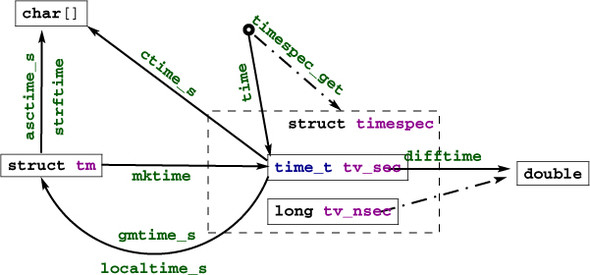
Two functions for the inverse operation from time_t into struct tm come into view:
As indicated, they differ in the time zone they assume for the conversion. Under normal circumstances, localtime_s and mktime should be inverse to each other; gmtime_s has no direct counterpart in the inverse direction.
Textual representations of calendar times are also available. asctime_s stores the date in a fixed format, independent of any locale, language (it uses English abbreviations), or platform dependency. The format is a string of the form
"Www Mmm DD HH:MM:SS YYYY\n"
strftime is more flexible and allows us to compose a textual representation with format specifiers.
It works similarly to the printf family but has special %-codes for dates and times; see table 8.13. Here, the Locale column indicates that different environment settings, such as preferred language or time zone, may influence the output. How to access and eventually set these will be explained in section 8.6. strftime receives three arrays: a char[max] array that is to be filled with the result string, another string that holds the format, and a struct tm const[1] that holds the time to be represented. The reason for passing in an array for the time will only become apparent when we know more about pointers.
The opaque type time_t (and as a consequence time itself) only has a granularity of seconds.
If we need more precision than that, struct timespec and the timespec_get function can be used. With that, we have an additional member tv_nsec that provides nanosecond precision. The second argument, base, has only one value defined by the C standard: TIME_UTC. You should expect a call to timespec_get with that value to be consistent with calls to time. They both refer to Earth’s reference time. Specific platforms may provide additional values for base that specify a clock that is different from a clock on the wall. An example of such a clock could be relative to the planetary or other physical system your computer system is involved with.[2] Relativity and other time adjustments can be avoided by using a monotonic clock that only refers to the startup time of the system. A CPU clock could refer to the time the program execution had been attributed processing resources.
Be aware that objects that move fast relative to Earth, such as satellites and spacecraft, may perceive relativistic time shifts compared to UTC.
For the latter, there is an additional interface that is provided by the C standard library:
clock_t clock(void);
For historical reasons, this introduces yet another type, clock_t. It is an arithmetic time that gives the processor time in CLOCKS_PER_SEC units per second.
Having three different interfaces, time, timespec_get, and clock, is a bit unfortunate. It would have been beneficial to provide predefined constants such as TIME_PROCESS_TIME and TIME_THREAD_TIME for other forms of clocks.
Can you compare the time efficiency of your sorting programs (challenge 1) with data sizes of several orders of magnitude?
Be careful to check that you have some randomness in the creation of the data and that the data size does not exceed the available memory of your computer.
For both algorithms, you should roughly observe a behavior that is proportional to N log N, where N is the number of elements that are sorted.
A C program can access an environment listC: a list of name-value pairs of strings (often called environment variablesC) that can transmit specific information from the runtime environment. There is a historical function getenv to access this list:
char* getenv(char const name[static 1]);
Given our current knowledge, with this function we are only able to test whether a name is present in the environment list:
bool havenv(char const name[static 1]) {
  return getenv(name);
}
Instead, we use the secured function getenv_s:
errno_t getenv_s(size_t * restrict len,
                 char value[restrict],
                 rsize_t maxsize,
                 char const name[restrict]);
This function copies the value that corresponds to name (if any) from the environment into value, a char[maxsize], provided that it fits. Printing such a value can look as this:
void printenv(char const name[static 1]) {
  if (getenv(name)) {
    char value[256] = { 0, };
    if (getenv_s(0, value, sizeof value, name)) {
      fprintf(stderr,
              "%s: value is longer than %zu\n",
              name, sizeof value);
    } else {
      printf("%s=%s\n", name, value);
    }
  } else {
    fprintf(stderr, "%s not in environment\n", name);
  }
}
As you can see, after detecting whether the environment variable exists, getenv_s can safely be called with the first argument set to 0. Additionally, it is guaranteed that the value target buffer will only be written if the intended result fits in it. The len parameter could be used to detect the real length that is needed, and dynamic buffer allocation could be used to print out even large values. We will wait until higher levels to see such usages.
Which environment variables are available to programs depends heavily on the operating system. Commonly provided environment variables include "HOME" for the user’s home directory, "PATH" for the collection of standard paths to executables, and "LANG" or "LC_ALL" for the language setting.
The language or localeC setting is another important part of the execution environment that a program execution inherits. At startup, C forces the locale setting to a normalized value, called the "C" locale. It has basically American English choices for numbers or times and dates.
<locale.h>
The function setlocale from locale.h can be used to set or inspect the current value:
char* setlocale(int category, char const locale[static 1]);
In addition to "C", the C standard prescribes the existence of one other valid value for locale: the empty string "". This can be used to set the effective locale to the systems default. The category argument can be used to address all or only parts of the language environment. Table 8.14 gives an overview over the possible values and the part of the C library they affect. Additional platform-dependent categories may be available.
| LC_COLLATE | String comparison through strcoll and strxfrm |
| LC_CTYPE | Character classification and handling functions; see section 8.4. |
| LC_MONETARY | Monetary formatting information, localeconv |
| LC_NUMERIC | Decimal-point character for formatted I/O, localeconv |
| LC_TIME | strftime; see section 8.5 |
| LC_ALL | All of the above |
We have looked at the simplest way to terminate a program: a regular return from main.
Regular program termination should use a return from main.
Using the function exit from within main is kind of senseless, because it can be done just as easily with a return.
Use exit from a function that may terminate the regular control flow.
The C library has three other functions that terminate program execution, in order of severity:
_Noreturn void quick_exit(int status);
_Noreturn void _Exit(int status);
_Noreturn void abort(void);
Now, return from main (or a call to exit) already provides the possibility to specify whether the program execution is considered to be a success. Use the return value to specify that; as long as you have no other needs or you don’t fully understand what these other functions do, don’t use them. Really: don’t.
Don’t use functions other than exit for program termination, unless you have to inhibit the execution of library cleanups.
Cleanup at program termination is important. The runtime system can flush and close files that are written or free other resources that the program occupied. This is a feature and should rarely be circumvented.
There is even a mechanism to install your own handlersC that are to be executed at program termination. Two functions can be used for that:
int atexit(void func(void));
int at_quick_exit(void func(void));
These have a syntax we have not yet seen: function parametersC. For example, the first reads “function atexit that returns an int and that receives a function func as a parameter.”[3]
In fact, in C, such a notion of a function parameter func to a function atexit is equivalent to passing a function pointerC . In descriptions of such functions, you will usually see the pointer variant. For us, this distinction is not yet relevant; it is simpler to think of a function being passed by reference.
We will not go into detail here. An example will show how this can be used:
void sayGoodBye(void) {
  if (errno) perror("terminating with error condition");
  fputs("Good Bye\n", stderr);
}

int main(int argc, char* argv[argc+1]) {
  atexit(sayGoodBye);
  ...
}
This uses the function atexit to establish the exit-handler sayGoodBye. After normal termination of the program code, this function will be executed and give the status of the execution. This might be a nice way to impress your co-workers if you are in need of some respect. More seriously, this is the ideal place to put all kinds of cleanup code, such as freeing memory or writing a termination timestamp to a log file. Observe that the syntax for calling is atexit(sayGoodBye). There are no () for sayGoodBye itself: here, sayGoodBye is not called at that point; only a reference to the function is passed to atexit.
Under rare circumstances, you might want to circumvent these established atexit handlers. There is a second pair of functions, quick_exit and at_quick_exit, that can be used to establish an alternative list of termination handlers. Such an alternative list may be useful if the normal execution of the handlers is too time consuming. Use with care.
The next function, _Exit, is even more severe: it inhibits both types of application-specific handlers to be executed. The only things that are executed are the platform-specific cleanups, such as file closure. Use this with even more care.
The last function, abort, is even more intrusive. Not only doesn’t it call the application handlers, but also it inhibits the execution of some system cleanups. Use this with extreme care.
At the beginning of this chapter, we looked at _Static_assert and static_assert, which should be used to make compile-time assertions. They can test for any form of compile-time Boolean expression. Two other identifiers come from assert.h and can be used for runtime assertions: assert and NDEBUG. The first can be used to test for an expression that must hold at a certain moment. It may contain any Boolean expression, and it may be dynamic. If the NDEBUG macro is not defined during compilation, every time execution passes by the call to this macro, the expression is evaluated. The functions gcd and gcd2 from section 7.3 show typical use cases of assert: a condition that is supposed to hold in every execution.
<assert.h>
If the condition doesn’t hold, a diagnostic message is printed, and abort is called. So, none of this should make it through into a production executable. From the earlier discussion, we know that the use of abort is harmful, in general, and also an error message such as
0 assertion failed in file euclid.h, function gcd2(), line 6
is not very helpful for your customers. It is helpful during the debugging phase, where it can lead you to spots where you make false assumptions about the values of variables.
Use as many asserts as you can to confirm runtime properties.
As mentioned, NDEBUG inhibits the evaluation of the expression and the call to abort. Please use it to reduce overhead.
In production compilations, use NDEBUG to switch off all assert.
In addition to the C standard library, there are many other support libraries out there that provide very different features. Among those are a lot that do image processing of some kind. Try to find a suitable such image-processing library that is written in or interfaced to C and that allows you to treat grayscale images as two-dimensional matrices of base type unsigned char.
The goal of this challenge is to perform a segmentation of such an image: to group the pixels (the unsigned char elements of the matrix) into connected regions that are “similar” in some sense or another. Such a segmentation forms a partition of the set of pixels, much as we saw in challenge 4. Therefore, you should use a Union-Find structure to represent regions, one per pixel at the start.
Can you implement a statistics function that computes a statistic for all regions? This should be another array (the third array in the game) that for each root holds the number of pixels and the sum of all values.
Can you implement a merge criterion for regions? Test whether the mean values of two regions are not too far apart: say, no more than five gray values.
Can you implement a line-by-line merge strategy that, for each pixel on a line of the image, tests whether its region should be merged to the left and/or to the top?
Can you iterate line by line until there are no more changes: that is, such that the resulting regions/sets all test negatively with their respective neighboring regions?
Now that you have a complete function for image segmentation, try it on images with assorted subjects and sizes, and also vary your merge criterion with different values for the mean distance instead of five.