Compared to our little examples in the previous chapter, real programs will be more complicated and contain additional constructs, but their structure will be very similar. Listing 1.1 already has most of the structural elements of a C program.
There are two categories of aspects to consider in a C program: syntactical aspects (how do we specify the program so the compiler understands it?) and semantic aspects (what do we specify so that the program does what we want it to do?). In the following sections, we will introduce the syntactical aspects (grammar) and three different semantic aspects: declarative parts (what things are), definitions of objects (where things are), and statements (what things are supposed to do).
Looking at its overall structure, we can see that a C program is composed of different types of text elements that are assembled in a kind of grammar. These elements are:
In C jargon, these are directivesC, keywordsC, and reservedC identifiers.
12 [3] = .00007,
One of the difficulties for newcomers in C is that the same punctuation characters are used to express different concepts.
For example, the pairs {} and [] are each used for three different purposes in listing 1.1.[[Exs 1]]Find these different uses of these two sorts of brackets.
Punctuation characters can be used with several different meanings.
5 /* The main thing that this program does. */Comments are ignored by the compiler. It is the perfect place to explain and document your code. Such in-place documentation can (and should) greatly improve the readability and comprehensibility of your code. Another form of comment is the so-called C++-style comment, as on line 15. These are marked with //. C++-style comments extend from the // to the end of the line.
Just as in natural languages, the lexical elements and the grammar of C programs that we have seen here have to be distinguished from the actual meaning these constructs convey. In contrast to natural languages, though, this meaning is rigidly specified and usually leaves no room for ambiguity. In the following sections, we will dig into the three main semantic categories that C distinguishes: declarations, definitions, and statements.
Before we may use a particular identifier in a program, we have to give the compiler a declarationC that specifies what that identifier is supposed to represent. This is where identifiers differ from keywords: keywords are predefined by the language and must not be declared or redefined.
All identifiers in a program have to be declared.
Three of the identifiers we use are effectively declared in our program: main, A, and i. Later on, we will see where the other identifiers (printf, size_t, and EXIT_SUCCESS) come from. We already mentioned the declaration of the main function. All three declarations, in isolation as “declarations only,” look like this:
int main(void);
double A[5];
size_t i;
These three follow a pattern. Each has an identifier (main, A, or i) and a specification of certain properties that are associated with that identifier:
Each of these declarations starts with a typeC, here int, double, and size_t. We will see later what that represents. For the moment, it is sufficient to know that this specifies that all three identifiers, when used in the context of a statement, will act as some sort of “numbers.”
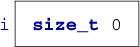
The declarations of i and A declare variablesC, which are named items that allow us to store valuesC. They are best visualized as a kind of box that may contain a “something” of a particular type:
Conceptually, it is important to distinguish the box itself (the object), the specification (its type), the box contents (its value), and the name or label that is written on the box (the identifier). In such diagrams, we put ?? if we don’t know the actual value of an item.
For the other three identifiers, printf, size_t, and EXIT_SUCCESS, we don’t see any declaration. In fact, they are predeclared identifiers, but as we saw when we tried to compile listing 1.2, the information about these identifiers doesn’t come out of nowhere. We have to tell the compiler where it can obtain information about them. This is done right at the start of the program, in lines 2 and 3: printf is provided by stdio.h, whereas size_t and EXIT_SUCCESS come from stdlib.h. The real declarations of these identifiers are specified in .h files with these names somewhere on your computer. They could be something like:
<stdio.h>
<stdlib.h>
int printf(char const format[static 1], ...);
typedef unsigned long size_t;
#define EXIT_SUCCESS 0
Because the specifics of these predeclared features are of minor importance, this information is normally hidden from you in these include filesC or header filesC. If you need to know their semantics, it is usually a bad idea to look them up in the corresponding files, as these tend to be barely readable. Instead, search in the documentation that comes with your platform. For the brave, I always recommend a look into the current C standard, as that is where they all come from. For the less courageous, the following commands may help:
0   > apropos printf
1   > man printf
2   > man 3 printf
A declaration only describes a feature but does not create it, so repeating a declaration does not do much harm but adds redundancy.
Identifiers may have several consistent declarations.
Clearly, it would become really confusing (for us or the compiler) if there were several contradicting declarations for the same identifier in the same part of the program, so generally this is not allowed. C is quite specific about what “the same part of the program” is supposed to mean: the scopeC is a part of the program where an identifier is visibleC.
Declarations are bound to the scope in which they appear.
These scopes of identifiers are unambiguously described by the grammar. In listing 1.1, we have declarations in different scopes:
In a slight abuse of terminology, the first two types of scope are called block scopeC, because the scope is limited by a blockC of matching { ... }. The third type, as used for main, which is not inside a { ... } pair, is called file scopeC. Identifiers in file scope are often referred to as globals.
Generally, declarations only specify the kind of object an identifier refers to, not what the concrete value of an identifier is, nor where the object it refers to can be found. This important role is filled by a definitionC.
Declarations specify identifiers, whereas definitions specify objects.
We will later see that things are a little more complicated in real life, but for now we can make the simplification that we will always initialize our variables. An initialization is a grammatical construct that augments a declaration and provides an initial value for the object. For instance,
size_t i = 0;
is a declaration of i such that the initial value is 0.
In C, such a declaration with an initializer also defines the object with the corresponding name: that is, it instructs the compiler to provide storage in which the value of the variable can be stored.
An object is defined at the same time it is initialized.
Our box visualization can now be completed with a value, 0 in this example:
A is a bit more complex because it has several components:
 8   double A[5] = {
 9     [0] = 9.0,
10     [1] = 2.9,
11     [4] = 3.E+25,
12     [3] = .00007,
13   };
This initializes the 5 items in A to the values 9.0, 2.9, 0.0, 0.00007, and 3.0E+25, in that order:

The form of an initializer that we see here is called designatedC: a pair of brackets with an integer designate which item of the array is initialized with the corresponding value. For example, [4] = 3.E+25 sets the last item of the array A to the value 3.E+25. As a special rule, any position that is not listed in the initializer is set to 0. In our example, the missing [2] is filled with 0.0.[2]
We will see later how these number literals with dots (.) and exponents (E+25) work.
Missing elements in initializers default to 0.
You might have noticed that array positions, indicesC, do not start with 1 for the first element, but with 0. Think of an array position as the distance of the corresponding array element from the start of the array.
For an array with n elements, the first element has index 0, and the last has index n-1.
For a function, we have a definition (as opposed to only a declaration) if its declaration is followed by braces { ... } containing the code of the function:
int main(void) {
  ...
}
In our examples so far, we have seen names for two different features: objectsC, i and A, and functionsC, main and printf. In contrast to object or function declarations, where several are allowed for the same identifier, definitions of objects or functions must be unique. That is, for a C program to be operational, any object or function that is used must have a definition (otherwise the execution would not know where to look for them), and there must be no more than one definition (otherwise the execution could become inconsistent).
Each object or function must have exactly one definition.
The second part of the main function consists primarily of statements. Statements are instructions that tell the compiler what to do with identifiers that have been declared so far. We have
16   for (size_t i = 0; i < 5; ++i) {
17      printf("element %zu is %g, \tits square is %g\n",
18             i,
19             A[i],
20             A[i]*A[i]);
21   }
22
23   return EXIT_SUCCESS;
We have already discussed the lines that correspond to the call to printf. There are also other types of statements: for and return statements, and an increment operation, indicated by the operatorC ++. In the following section, we will go a bit into the details of three categories of statements: iterations (do something several times), function calls (delegate execution somewhere else), and function returns (resume execution from where a function was called).
The for statement tells the compiler that the program should execute the printf line a number of times. This is the simplest form of domain iterationC that C has to offer. It has four different parts.
The code that is to be repeated is called the loop bodyC: it is the { ... } block that follows the for ( ... ). The other three parts are those inside the ( ... ) part, divided by semicolons:
If we put all of these together, we ask the program to perform the part in the block five times, setting the value of i to 0, 1, 2, 3, and 4, respectively, in each iteration. The fact that we can identify each iteration with a specific value for i makes this an iteration over the domainC 0, . . ., 4. There is more than one way to do this in C, but for is the easiest, cleanest, and best tool for the task.
Domain iterations should be coded with a for statement.
A for statement can be written in several ways other than what we just saw. Often, people place the definition of the loop variable somewhere before the for or even reuse the same variable for several loops. Don’t do that: to help an occasional reader and the compiler understand your code, it is important to know that this variable has the special meaning of an iteration counter for that given for loop.
The loop variable should be defined in the initial part of a for.
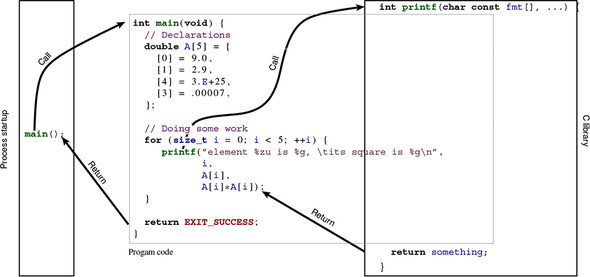
Function calls are special statements that suspend the execution of the current function (at the beginning, this is usually main) and then hand over control to the named function. In our example
17      printf("element %zu is %g, \tits square is %g\n",
18             i,
19             A[i],
20             A[i]*A[i]);
the called function is printf. A function call usually provides more than just the name of the function, but also arguments. Here, these are the long chain of characters, i, A[i], and A[i]*A[i]. The values of these arguments are passed over to the function. In this case, these values are the information that is printed by printf. The emphasis here is on “value”: although i is an argument, printf will never be able to change i itself. Such a mechanism is called call by value. Other programming languages also have call by reference, a mechanism where the called function can change the value of a variable. C does not implement pass by reference, but it has another mechanism to pass the control of a variable to another function: by taking addresses and transmitting pointers. We will see these mechanism much later.
The last statement in main is a return. It tells the main function to return to the statement that it was called from once it’s done. Here, since main has int in its declaration, a return must send back a value of type int to the calling statement. In this case, that value is EXIT_SUCCESS.
Even though we can’t see its definition, the printf function must contain a similar return statement. At the point where we call the function on line 17, execution of the statements in main is temporarily suspended. Execution continues in the printf function until a return is encountered. After the return from printf, execution of the statements in main continues from where it stopped.
Figure 2.1 shows a schematic view of the execution of our little program: its control flow. First, a process-startup routine (on the left) that is provided by our platform calls the user-provided function main (middle). That, in turn, calls printf, a function that is part of the C libraryC, on the right. Once a return is encountered there, control returns back to main; and when we reach the return in main, it passes back to the startup routine. The latter transfer of control, from a programmer’s point of view, is the end of the program’s execution.