Chapter 8. Shave and a Haircut
I’m a mess / Since you cut me out / But Chucky’s arm keeps me company
They Might Be Giants, “Cyclops Rock” (2001)
For the next challenge program, you will create a Rust version of cut, which will excise text from a file or STDIN.
The selected text could be some range of bytes or characters or might be fields denoted by a delimiter like a comma or tab that creates field boundaries.
You learned how to select a contiguous range of characters or bytes in Chapter 4, while working on the headr program, but this challenge goes further as the selections may be noncontiguous and in any order.
For example, the selection 3,1,5-7 should cause the challenge program to print the third, first, and fifth through seventh bytes, characters, or fields, in that order.
The challenge program will capture the spirit of the original but will not strive for complete fidelity, as I will suggest a few changes that I feel are improvements.
In this chapter, you will learn how to do the following:
-
Read and write a delimited text file using the
csvcrate -
Deference a value using
* -
Use
Iterator::flattento remove nested structures from iterators -
Use
Iterator::flat_mapto combineIterator::mapandIterator::flatten
How cut Works
I will start by reviewing the portion of the BSD cut manual page that describes the features of the program you will write:
CUT(1)                    BSD General Commands Manual                   CUT(1)

NAME
     cut -- cut out selected portions of each line of a file

SYNOPSIS
     cut -b list [-n] [file ...]
     cut -c list [file ...]
     cut -f list [-d delim] [-s] [file ...]

DESCRIPTION
     The cut utility cuts out selected portions of each line (as specified by
     list) from each file and writes them to the standard output.  If no file
     arguments are specified, or a file argument is a single dash ('-'), cut
     reads from the standard input.  The items specified by list can be in
     terms of column position or in terms of fields delimited by a special
     character.  Column numbering starts from 1.

     The list option argument is a comma or whitespace separated set of num-
     bers and/or number ranges.  Number ranges consist of a number, a dash
     ('-'), and a second number and select the fields or columns from the
     first number to the second, inclusive.  Numbers or number ranges may be
     preceded by a dash, which selects all fields or columns from 1 to the
     last number.  Numbers or number ranges may be followed by a dash, which
     selects all fields or columns from the last number to the end of the
     line.  Numbers and number ranges may be repeated, overlapping, and in any
     order.  If a field or column is specified multiple times, it will appear
     only once in the output.  It is not an error to select fields or columns
     not present in the input line.
The original tool offers quite a few options, but the challenge program will implement only the following:
     -b list
             The list specifies byte positions.

     -c list
             The list specifies character positions.

     -d delim
             Use delim as the field delimiter character instead of the tab
             character.

     -f list
             The list specifies fields, separated in the input by the field
             delimiter character (see the -d option.)  Output fields are sepa-
             rated by a single occurrence of the field delimiter character.
As usual, the GNU version offers both short and long flags for these options:
NAME
       cut - remove sections from each line of files

SYNOPSIS
       cut OPTION... [FILE]...

DESCRIPTION
       Print selected parts of lines from each FILE to standard output.

       Mandatory  arguments  to  long  options are mandatory for short options
       too.

       -b, --bytes=LIST
              select only these bytes

       -c, --characters=LIST
              select only these characters

       -d, --delimiter=DELIM
              use DELIM instead of TAB for field delimiter

       -f, --fields=LIST
              select only these fields;  also print any line that contains  no
              delimiter character, unless the -s option is specified
Both tools implement the selection ranges in similar ways, where numbers can be selected individually, in closed ranges like 1-3, or in partially defined ranges like
-3 to indicate 1 through 3 or 5- to indicate 5 to the end, but the challenge program will support only closed ranges.
I’ll use some of the files found in the book’s 08_cutr/tests/inputs directory to show the features that the challenge program will implement.
You should change into this directory if you want to execute the following commands:
$ cd 08_cutr/tests/inputs
First, consider a file of fixed-width text where each column occupies a fixed number of characters:
$ cat books.txt
Author              Year Title
Émile Zola          1865 La Confession de Claude
Samuel Beckett      1952 Waiting for Godot
Jules Verne         1870 20,000 Leagues Under the Sea
The Author column takes the first 20 characters:
$ cut -c 1-20 books.txt
Author
Émile Zola
Samuel Beckett
Jules Verne
The publication Year column spans the next five characters:
$ cut -c 21-25 books.txt
Year
1865
1952
1870
The Title column fills the remainder of the line, where the longest title is 28 characters. Note here that I intentionally request a larger range than exists to show that this is not considered an error:
$ cut -c 26-70 books.txt
Title
La Confession de Claude
Waiting for Godot
20,000 Leagues Under the Sea
The program does not allow me to rearrange the output by requesting the range 26-55 for the Title followed by the range 1-20 for the Author.
Instead, the selections are placed in their original, ascending order:
$ cut -c 26-55,1-20 books.txt
Author              Title
Émile Zola          La Confession de Claude
Samuel Beckett      Waiting for Godot
Jules Verne         20,000 Leagues Under the Sea
I can use the option -c 1 to select the first character, like so:
$ cut -c 1 books.txt
A
É
S
J
As you’ve seen in previous chapters, bytes and characters are not always interchangeable. For instance, the É in Émile Zola is a Unicode character that is composed of two bytes, so asking for just one byte will result in invalid UTF-8 that is represented with the Unicode replacement character:
$ cut -b 1 books.txt
A
�
S
J
In my experience, fixed-width datafiles are less common than those where the columns of data are delimited by a character such as a comma or a tab. Consider the same data in the file books.tsv, where the file extension .tsv stands for tab-separated values (TSV) and the columns are delimited by the tab:
$ cat books.tsv
Author	Year	Title
Émile Zola	1865	La Confession de Claude
Samuel Beckett	1952	Waiting for Godot
Jules Verne	1870	20,000 Leagues Under the Sea
By default, cut will assume the tab character is the field delimiter, so I can use the -f option to select, for instance, the publication year in the second column and the title in the third column, like so:
$ cut -f 2,3 books.tsv
Year	Title
1865	La Confession de Claude
1952	Waiting for Godot
1870	20,000 Leagues Under the Sea
The comma is another common delimiter, and such files often have the extension .csv for comma-separated values (CSV). Following is the same data as a CSV file:
$ cat books.csv
Author,Year,Title
Émile Zola,1865,La Confession de Claude
Samuel Beckett,1952,Waiting for Godot
Jules Verne,1870,"20,000 Leagues Under the Sea"
To parse a CSV file, I must indicate the delimiter with the -d option.
Note that I’m still unable to reorder the fields in the output, as I indicate 2,1 for the second column followed by the first, but I get the columns back in their original order:
$ cut -d , -f 2,1 books.csv
Author,Year
Émile Zola,1865
Samuel Beckett,1952
Jules Verne,1870
You may have noticed that the third title contains a comma in 20,000 and so the title has been enclosed in quotes to indicate that this comma is not a field delimiter.
This is a way to escape the delimiter, or to tell the parser to ignore it.
Unfortunately, neither the BSD nor the GNU version of cut recognizes this and so will truncate the title
prematurely:
$ cut -d , -f 1,3 books.csv
Author,Title
Émile Zola,La Confession de Claude
Samuel Beckett,Waiting for Godot
Jules Verne,"20
Noninteger values for any of the list option values are rejected:
$ cut -f foo,bar books.tsv
cut: [-cf] list: illegal list value
Any error opening a file is handled in the course of processing, printing a message to STDERR.
In the following example, blargh represents a nonexistent file:
$ cut -c 1 books.txt blargh movies1.csv
A
É
S
J
cut: blargh: No such file or directory
t
T
L
Finally, the program will read STDIN by default or if the given input filename is a
dash (-):
$ cat books.tsv | cut -f 2
Year
1865
1952
1870
The challenge program is expected to implement just this much, with the following changes:
Getting Started
The name of the challenge program should be cutr (pronounced cut-er) for a Rust version of cut.
I recommend you begin with cargo new cutr and then copy the 08_cutr/tests directory into your project.
My solution will use the following crates, which you should add to your Cargo.toml:
[dependencies]clap="2.33"csv="1"regex="1"[dev-dependencies]assert_cmd="2"predicates="2"rand="0.8"

The
csvcrate will be used to parse delimited files such as CSV files.
Run cargo test to download the dependencies and run the tests, all of which should fail.
Defining the Arguments
Use the following structure for your src/main.rs:
fnmain(){ifletErr(e)=cutr::get_args().and_then(cutr::run){eprintln!("{}",e);std::process::exit(1);}}
In the following code, I want to highlight that I’m creating an enum where the
variants can hold a value.
In this case, the type alias PositionList, which is a Vec<Range<usize>> or a vector of std::ops::Range structs, will represent spans of positive integer values.
Here is how I started my src/lib.rs:
usecrate::Extract::*;useclap::{App,Arg};usestd::{error::Error,ops::Range};typeMyResult<T>=Result<T,Box<dynError>>;typePositionList=Vec<Range<usize>>;#[derive(Debug)]pubenumExtract{Fields(PositionList),Bytes(PositionList),Chars(PositionList),}#[derive(Debug)]pubstructConfig{files:Vec<String>,delimiter:u8,extract:Extract,}
This allows me to use
Fields(...)instead ofExtract::Fields(...).
A
PositionListis a vector ofRange<usize>values.
Define an
enumto hold the variants for extracting fields, bytes, or characters.
The
filesparameter will be a vector of strings.
The
delimitershould be a single byte.
The
extractfield will hold one of theExtractvariants.
Unlike the original cut tool, the challenge program will allow only for a comma-separated list of either single numbers or ranges like 2-4.
Also, the challenge program will use the selections in the given order rather than rearranging them in ascending order.
You can start your get_args by expanding on the following skeleton:
pubfnget_args()->MyResult<Config>{letmatches=App::new("cutr").version("0.1.0").author("Ken Youens-Clark <kyclark@gmail.com>").about("Rust cut")// What goes here?.get_matches();Ok(Config{files:...delimiter:...extract:...})}
Begin your run by printing the config:
pubfnrun(config:Config)->MyResult<()>{println!("{:#?}",&config);Ok(())}
Following is the expected usage for the program:
$ cargo run -- --help
cutr 0.1.0
Ken Youens-Clark <kyclark@gmail.com>
Rust cut

USAGE:
    cutr [OPTIONS] [FILE]...

FLAGS:
    -h, --help       Prints help information
    -V, --version    Prints version information

OPTIONS:
    -b, --bytes <BYTES>        Selected bytes
    -c, --chars <CHARS>        Selected characters
    -d, --delim <DELIMITER>    Field delimiter [default: 	]
    -f, --fields <FIELDS>      Selected fields

ARGS:
    <FILE>...    Input file(s) [default: -]
To parse and validate the range values for the byte, character, and field arguments, I wrote a function called parse_pos that accepts a &str and might return a PositionList.
Here is how you might start it:
fnparse_pos(range:&str)->MyResult<PositionList>{unimplemented!();}
Tip
This function is similar to the parse_positive_int function from Chapter 4. See how much of that code can be reused here.
To help you along, I have written an extensive unit test for the numbers and number ranges that should be accepted or rejected.
The numbers may have leading zeros but may not have any nonnumeric characters, and number ranges must be denoted with a dash (-).
Multiple numbers and ranges can be separated with commas.
In this chapter, I will create a unit_tests module so that cargo test unit will run all the unit tests.
Note that my implementation of parse_pos uses index positions where I subtract one from each value for zero-based indexing, but you may prefer to handle this differently.
Add the following to your src/lib.rs:
#[cfg(test)]modunit_tests{usesuper::parse_pos;#[test]fntest_parse_pos(){// The empty string is an errorassert!(parse_pos("").is_err());// Zero is an errorletres=parse_pos("0");assert!(res.is_err());assert_eq!(res.unwrap_err().to_string(),"illegal list value:\"0\"",);letres=parse_pos("0-1");assert!(res.is_err());assert_eq!(res.unwrap_err().to_string(),"illegal list value:\"0\"",);// A leading "+" is an errorletres=parse_pos("+1");assert!(res.is_err());assert_eq!(res.unwrap_err().to_string(),"illegal list value:\"+1\"",);letres=parse_pos("+1-2");assert!(res.is_err());assert_eq!(res.unwrap_err().to_string(),"illegal list value:\"+1-2\"",);letres=parse_pos("1-+2");assert!(res.is_err());assert_eq!(res.unwrap_err().to_string(),"illegal list value:\"1-+2\"",);// Any non-number is an errorletres=parse_pos("a");assert!(res.is_err());assert_eq!(res.unwrap_err().to_string(),"illegal list value:\"a\"",);letres=parse_pos("1,a");assert!(res.is_err());assert_eq!(res.unwrap_err().to_string(),"illegal list value:\"a\"",);letres=parse_pos("1-a");assert!(res.is_err());assert_eq!(res.unwrap_err().to_string(),"illegal list value:\"1-a\"",);letres=parse_pos("a-1");assert!(res.is_err());assert_eq!(res.unwrap_err().to_string(),"illegal list value:\"a-1\"",);// Wonky rangesletres=parse_pos("-");assert!(res.is_err());letres=parse_pos(",");assert!(res.is_err());letres=parse_pos("1,");assert!(res.is_err());letres=parse_pos("1-");assert!(res.is_err());letres=parse_pos("1-1-1");assert!(res.is_err());letres=parse_pos("1-1-a");assert!(res.is_err());// First number must be less than secondletres=parse_pos("1-1");assert!(res.is_err());assert_eq!(res.unwrap_err().to_string(),"First number in range (1) must be lower than second number (1)");letres=parse_pos("2-1");assert!(res.is_err());assert_eq!(res.unwrap_err().to_string(),"First number in range (2) must be lower than second number (1)");// All the following are acceptableletres=parse_pos("1");assert!(res.is_ok());assert_eq!(res.unwrap(),vec![0..1]);letres=parse_pos("01");assert!(res.is_ok());assert_eq!(res.unwrap(),vec![0..1]);letres=parse_pos("1,3");assert!(res.is_ok());assert_eq!(res.unwrap(),vec![0..1,2..3]);letres=parse_pos("001,0003");assert!(res.is_ok());assert_eq!(res.unwrap(),vec![0..1,2..3]);letres=parse_pos("1-3");assert!(res.is_ok());assert_eq!(res.unwrap(),vec![0..3]);letres=parse_pos("0001-03");assert!(res.is_ok());assert_eq!(res.unwrap(),vec![0..3]);letres=parse_pos("1,7,3-5");assert!(res.is_ok());assert_eq!(res.unwrap(),vec![0..1,6..7,2..5]);letres=parse_pos("15,19-20");assert!(res.is_ok());assert_eq!(res.unwrap(),vec![14..15,18..20]);}}
Some of the preceding tests check for a specific error message to help you write the parse_pos function; however, these could prove troublesome if you were trying to internationalize the error messages.
An alternative way to check for specific errors would be to use enum variants that would allow the user interface to customize the output while still testing for specific errors.
Note
At this point, I expect you can read the preceding code well enough to understand how the function should work. I recommend you stop reading at this point and write the code that will pass this test.
After cargo test unit passes, incorporate the parse_pos function into get_args so that your program will reject invalid arguments and print an error message like the following:
$ cargo run -- -f foo,bar tests/inputs/books.tsv
illegal list value: "foo"
The program should also reject invalid ranges:
$ cargo run -- -f 3-2 tests/inputs/books.tsv
First number in range (3) must be lower than second number (2)
When given valid arguments, your program should display a structure like so:
$ cargo run -- -f 1 -d , tests/inputs/movies1.csv
Config {
    files: [
        "tests/inputs/movies1.csv",
    ],
    delimiter: 44,
    extract: Fields(
        [
            0..1,
        ],
    ),
}
The positional argument goes into
files.The
-dvalue of a comma has a byte value of44.The
-f 1argument creates theExtract::Fieldsvariant that holds a single range,0..1.
When parsing a TSV file, use the tab as the default delimiter, which has a byte value of 9:
$ cargo run -- -f 2-3 tests/inputs/movies1.tsv
Config {
    files: [
        "tests/inputs/movies1.tsv",
    ],
    delimiter: 9,
    extract: Fields(
        [
            1..3,
        ],
    ),
}
Note that the options for -f|--fields, -b|--bytes, and -c|--chars should all be mutually exclusive:
$ cargo run -- -f 1 -b 8-9 tests/inputs/movies1.tsv
error: The argument '--fields <FIELDS>' cannot be used with '--bytes <BYTES>'
Note
Stop here and get your program working as described. The program should be able to pass all the tests that verify the validity of the inputs, which you can run with cargo test dies:
running 10 tests
test dies_bad_delimiter ... ok
test dies_chars_fields ... ok
test dies_chars_bytes_fields ... ok
test dies_bytes_fields ... ok
test dies_chars_bytes ... ok
test dies_not_enough_args ... ok
test dies_empty_delimiter ... ok
test dies_bad_digit_field ... ok
test dies_bad_digit_bytes ... ok
test dies_bad_digit_chars ... ok
If you find you need more guidance on writing the parse_pos function, I’ll provide that in the next section.
Parsing the Position List
The parse_pos function I will show relies on a parse_index function that attempts to parse a string into a positive index value one less than the given number, because the user will provide one-based values but Rust needs zero-offset indexes.
The given string may not start with a plus sign, and the parsed value must be greater than zero.
Note that closures normally accept arguments inside pipes (||), but the following function uses two closures that accept no arguments, which is why the pipes are empty.
Both closures instead reference the provided input value.
For the following code, be sure to add use std::num::NonZeroUsize to your imports:
fnparse_index(input:&str)->Result<usize,String>{letvalue_error=||format!("illegal list value:\"{}\"",input);input.starts_with('+').then(||Err(value_error())).unwrap_or_else(||{input.parse::<NonZeroUsize>().map(|n|usize::from(n)-1).map_err(|_|value_error())})}
Create a closure that accepts no arguments and formats an error string.
Check if the input value starts with a plus sign.
If so, create an error.
Otherwise, continue with the following closure, which accepts no arguments.
Use
str::parseto parse the input value, and use the turbofish to indicate the return type ofstd::num::NonZeroUsize, which is a positive integer value.If the input value parses successfully, cast the value to a
usizeand decrement the value to a zero-based offset.
If the value does not parse, generate an error by calling the
value_errorclosure.
The following is how parse_index is used in the parse_pos function.
Add use regex::Regex to your imports for this:
fnparse_pos(range:&str)->MyResult<PositionList>{letrange_re=Regex::new(r"^(\d+)-(\d+)$").unwrap();range.split(',').into_iter().map(|val|{parse_index(val).map(|n|n..n+1).or_else(|e|{range_re.captures(val).ok_or(e).and_then(|captures|{letn1=parse_index(&captures[1])?;letn2=parse_index(&captures[2])?;ifn1>=n2{returnErr(format!("First number in range ({})\must be lower than second number ({})",n1+1,n2+1));}Ok(n1..n2+1)})})}).collect::<Result<_,_>>().map_err(From::from)}
Create a regular expression to match two integers separated by a dash, using parentheses to capture the matched numbers.
Split the provided range value on the comma and turn the result into an iterator. In the event there are no commas, the provided value itself will be used.
Map each split value into the closure.
If
parse_indexparses a single number, then create aRangefor the value. Otherwise, note the error valueeand continue trying to parse a range.If the
Regexmatches the value, the numbers in parentheses will be available throughRegex::captures.Parse the two captured numbers as index values.
If the first value is greater than or equal to the second, return an error.

Otherwise, create a
Rangefrom the lower number to the higher number, adding 1 to ensure the upper number is included.
Use
Iterator::collectto gather the values as aResult.
Map any problems through
From::fromto create an error.
The regular expression in the preceding code is enclosed with r"" to denote a raw string, which prevents Rust from interpreting backslash-escaped values in the string.
For instance, you’ve seen that Rust will interpret \n as a newline.
Without this, the compiler complains that \d is an unknown character escape:
error: unknown character escape: `d`
   --> src/lib.rs:127:35
    |
127 |     let range_re = Regex::new("^(\d+)-(\d+)$").unwrap();
    |                                   ^ unknown character escape
    |
    = help: for more information, visit <https://static.rust-lang.org
      /doc/master/reference.html#literals>
I would like to highlight the parentheses in the regular expression ^(\d+)-(\d+)$ to indicate one or more digits followed by a dash followed by one or more digits, as shown in Figure 8-1.
If the regular expression matches the given string, then I can use Regex::captures to extract the digits that are surrounded by the parentheses.
Note that they are available in one-based counting, so the contents of the first capturing parentheses are available in position 1 of the captures.
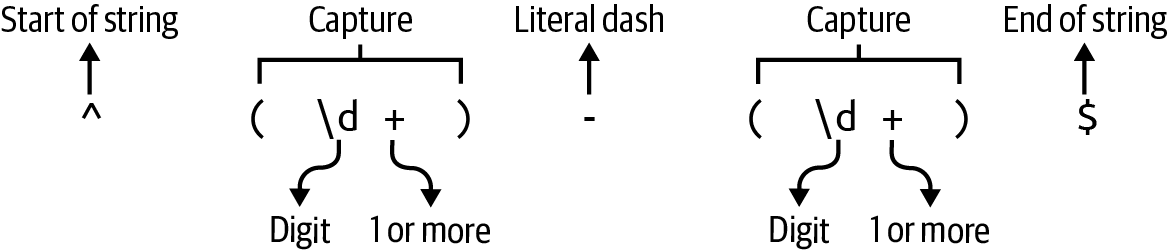
Figure 8-1. The parentheses in the regular expression will capture the values they surround.
Note
Now that you have a way to parse and validate the numeric ranges, finish your get_args function before reading further.
Here is how I incorporate the parse_pos function into my get_args.
First, I define all the arguments:
pubfnget_args()->MyResult<Config>{letmatches=App::new("cutr").version("0.1.0").author("Ken Youens-Clark <kyclark@gmail.com>").about("Rust cut").arg(Arg::with_name("files").value_name("FILE").help("Input file(s)").multiple(true).default_value("-"),).arg(Arg::with_name("delimiter").value_name("DELIMITER").short("d").long("delim").help("Field delimiter").default_value("\t"),).arg(Arg::with_name("fields").value_name("FIELDS").short("f").long("fields").help("Selected fields").conflicts_with_all(&["chars","bytes"]),).arg(Arg::with_name("bytes").value_name("BYTES").short("b").long("bytes").help("Selected bytes").conflicts_with_all(&["fields","chars"]),).arg(Arg::with_name("chars").value_name("CHARS").short("c").long("chars").help("Selected characters").conflicts_with_all(&["fields","bytes"]),).get_matches();
The required
filesoption accepts multiple values and defaults to a dash.The
delimiteroption uses the tab as the default value.The
fieldsoption conflicts withcharsandbytes.The
bytesoption conflicts withfieldsandchars.The
charsoptions conflicts withfieldsandbytes.
Next, I convert the delimiter to a vector of bytes and verify that the vector contains a single byte:
letdelimiter=matches.value_of("delimiter").unwrap();letdelim_bytes=delimiter.as_bytes();ifdelim_bytes.len()!=1{returnErr(From::from(format!("--delim\"{}\"must be a single byte",delimiter)));}
I use the parse_pos function to handle all the optional list values:
letfields=matches.value_of("fields").map(parse_pos).transpose()?;letbytes=matches.value_of("bytes").map(parse_pos).transpose()?;letchars=matches.value_of("chars").map(parse_pos).transpose()?;
Next, I figure out which Extract variant to create or generate an error if the user fails to select bytes, characters, or fields:
letextract=ifletSome(field_pos)=fields{Fields(field_pos)}elseifletSome(byte_pos)=bytes{Bytes(byte_pos)}elseifletSome(char_pos)=chars{Chars(char_pos)}else{returnErr(From::from("Must have --fields, --bytes, or --chars"));};
If the code makes it to this point, then I appear to have valid arguments that I can return:
Ok(Config{files:matches.values_of_lossy("files").unwrap(),delimiter:*delim_bytes.first().unwrap(),extract,})}
Use
Vec::firstto select the first element of the vector. Because I have verified that this vector has exactly one byte, it is safe to callOption::unwrap.
In the preceding code, I use the Deref::deref operator * in the expression *delim_bytes to dereference the variable, which is a &u8.
The code will not compile without the asterisk, and the error message shows exactly where to add the dereference operator:
error[E0308]: mismatched types
  --> src/lib.rs:94:20
   |
94 |         delimiter: delim_bytes.first().unwrap(),
   |                    ^^^^^^^^^^^^^^^^^^^^^^^^^^^^ expected `u8`, found `&u8`
   |
help: consider dereferencing the borrow
   |
94 |         delimiter: *delim_bytes.first().unwrap(),
   |                    +
Next, you will need to figure out how you will use this information to extract the desired bits from the inputs.
Extracting Characters or Bytes
In Chapters 4 and 5, you learned how to process lines, bytes, and characters in a file.
You should draw on those programs to help you select characters and bytes in this challenge.
One difference is that line endings need not be preserved, so you may use BufRead::lines to read the lines of input text.
To start, you might consider bringing in the open function to open each file:
fnopen(filename:&str)->MyResult<Box<dynBufRead>>{matchfilename{"-"=>Ok(Box::new(BufReader::new(io::stdin()))),_=>Ok(Box::new(BufReader::new(File::open(filename)?))),}}
The preceding function will require some additional imports:
usecrate::Extract::*;useclap::{App,Arg};useregex::Regex;usestd::{error::Error,fs::File,io::{self,BufRead,BufReader},num::NonZeroUsize,ops::Range,};
You can expand your run to handle good and bad files:
pubfnrun(config:Config)->MyResult<()>{forfilenamein&config.files{matchopen(filename){Err(err)=>eprintln!("{}: {}",filename,err),Ok(_)=>println!("Opened {}",filename),}}Ok(())}
At this point, the program should pass cargo test skips_bad_file, and you can manually verify that it skips invalid files such as the nonexistent blargh:
$ cargo run -- -c 1 tests/inputs/books.csv blargh
Opened tests/inputs/books.csv
blargh: No such file or directory (os error 2)
Now consider how you might extract ranges of characters from each line of a filehandle.
I wrote a function called extract_chars that will return a new string composed of the characters at the given index positions:
fnextract_chars(line:&str,char_pos:&[Range<usize>])->String{unimplemented!();}
I originally wrote the preceding function with the type annotation &PositionList
for char_pos.
When I checked the code with Clippy, it suggested the type &[Range<usize>] instead.
The type &PositionList is more restrictive on callers than is really necessary, and I do make use of the additional flexibility in the tests, so Clippy is being quite helpful here:
warning: writing `&Vec<_>` instead of `&[_]` involves one more reference
and cannot be used with non-Vec-based slices
   --> src/lib.rs:223:40
    |
223 | fn extract_chars(line: &str, char_pos: &PositionList) -> String {
    |                                        ^^^^^^^^^^^^^
    |
    = note: `#[warn(clippy::ptr_arg)]` on by default
    = help: for further information visit
      https://rust-lang.github.io/rust-clippy/master/index.html#ptr_arg
The following is a test you can add to the unit_tests module.
Be sure to add extract_chars to the module’s imports:
#[test]fntest_extract_chars(){assert_eq!(extract_chars("",&[0..1]),"".to_string());assert_eq!(extract_chars("ábc",&[0..1]),"á".to_string());assert_eq!(extract_chars("ábc",&[0..1,2..3]),"ác".to_string());assert_eq!(extract_chars("ábc",&[0..3]),"ábc".to_string());assert_eq!(extract_chars("ábc",&[2..3,1..2]),"cb".to_string());assert_eq!(extract_chars("ábc",&[0..1,1..2,4..5]),"áb".to_string());}
I also wrote a similar extract_bytes function to parse out bytes:
fnextract_bytes(line:&str,byte_pos:&[Range<usize>])->String{unimplemented!();}
For the following unit test, be sure to add extract_bytes to the module’s imports:
#[test]fntest_extract_bytes(){assert_eq!(extract_bytes("ábc",&[0..1]),"�".to_string());assert_eq!(extract_bytes("ábc",&[0..2]),"á".to_string());assert_eq!(extract_bytes("ábc",&[0..3]),"áb".to_string());assert_eq!(extract_bytes("ábc",&[0..4]),"ábc".to_string());assert_eq!(extract_bytes("ábc",&[3..4,2..3]),"cb".to_string());assert_eq!(extract_bytes("ábc",&[0..2,5..6]),"á".to_string());}
Note that selecting one byte from the string ábc should break the multibyte á and result in the Unicode replacement character.
Note
Once you have written these two functions so that they pass tests, incorporate them into your main program so that you pass the integration tests for printing bytes and characters. The failing tests that include tsv and csv in the names involve reading text delimited by tabs and commas, which I’ll discuss in the next section.
Parsing Delimited Text Files
Next, you will need to learn how to parse comma- and tab-delimited text files.
Technically, all the files you’ve read to this point were delimited in some manner, such as with newlines to denote the end of a line.
In this case, a delimiter like a tab or a comma is used to separate the fields of a record, which is terminated with a newline.
Sometimes the delimiting character may also be part of the data, as when the title 20,000 Leagues Under the Sea occurs in a CSV file.
In this case, the field should be enclosed in quotes to escape the delimiter.
As noted in the chapter’s introduction, neither the BSD nor the GNU version of cut respects this escaped delimiter, but the challenge program will.
The easiest way to properly parse delimited text is to use something like the csv crate.
I highly recommend that you first read the tutorial, which explains the basics of working with delimited text files and how to use the csv module effectively.
Consider the following example that shows how you can use this crate to parse delimited data.
If you would like to compile and run this code, start a new project, add the csv = "1" dependency to your Cargo.toml, and copy the tests/inputs/books.csv file into the root directory of the new project.
Use the following for src/main.rs:
usecsv::{ReaderBuilder,StringRecord};usestd::fs::File;fnmain()->std::io::Result<()>{letmutreader=ReaderBuilder::new().delimiter(b',').from_reader(File::open("books.csv")?);println!("{}",fmt(reader.headers()?));forrecordinreader.records(){println!("{}",fmt(&record?));}Ok(())}fnfmt(rec:&StringRecord)->String{rec.into_iter().map(|v|format!("{:20}",v)).collect()}
Use
csv::ReaderBuilderto parse a file.The
delimitermust be a singleu8byte.The
from_readermethod accepts a value that implements theReadtrait.The
Reader::headersmethod will return the column names in the first row as aStringRecord.The
Reader::recordsmethod provides access to an iterator overStringRecordvalues.Print a formatted version of the record.
Use
Iterator::mapto format the values into a field 20 characters wide and collect the values into a newString.
If you run this program, you will see that the comma in 20,000 Leagues Under the Sea was not used as a field delimiter because it was found within quotes, which themselves are metacharacters that have been removed:
$ cargo run
Author              Year                Title
Émile Zola          1865                La Confession de Claude
Samuel Beckett      1952                Waiting for Godot
Jules Verne         1870                20,000 Leagues Under the Sea
Tip
In addition to csv::ReaderBuilder, you should use csv::WriterBuilder in your solution to escape the input delimiter in the output of the program.
Think about how you might use some of the ideas I just demonstrated in your challenge program.
For example, you could write a function like extract_fields that accepts a csv::StringRecord and pulls out the fields found in the PositionList.
For the following function, add use csv::StringRecord to the top of src/lib.rs:
fnextract_fields(record:&StringRecord,field_pos:&[Range<usize>])->Vec<String>{unimplemented!();}
Following is a unit test for this function that you can add to the unit_tests module:
#[test]fntest_extract_fields(){letrec=StringRecord::from(vec!["Captain","Sham","12345"]);assert_eq!(extract_fields(&rec,&[0..1]),&["Captain"]);assert_eq!(extract_fields(&rec,&[1..2]),&["Sham"]);assert_eq!(extract_fields(&rec,&[0..1,2..3]),&["Captain","12345"]);assert_eq!(extract_fields(&rec,&[0..1,3..4]),&["Captain"]);assert_eq!(extract_fields(&rec,&[1..2,0..1]),&["Sham","Captain"]);}
At this point, the unit_tests module will need all of the following imports:
usesuper::{extract_bytes,extract_chars,extract_fields,parse_pos};usecsv::StringRecord;
Note
Once you are able to pass this last unit test, you should use all of the extract_* functions to print the desired bytes, characters, and fields from the input files. Be sure to run cargo test to see what is and is not working. This is a challenging program, so don’t give up too quickly. Fear is the mind-killer.
Solution
I’ll show you my solution now, but I would again stress that there are many ways to write this program.
Any version that passes the test suite is acceptable.
I’ll begin by showing how I evolved extract_chars to select the characters.
Selecting Characters from a String
In this first version of extract_chars, I initialize a mutable vector to accumulate the results and then use an imperative approach to select the desired characters:
fnextract_chars(line:&str,char_pos:&[Range<usize>])->String{letchars:Vec<_>=line.chars().collect();letmutselected:Vec<char>=vec![];forrangeinchar_pos.iter().cloned(){foriinrange{ifletSome(val)=chars.get(i){selected.push(*val)}}}selected.iter().collect()}
Use
str::charsto split the line of text into characters. TheVectype annotation is required by Rust becauseIterator::collectcan return many different types of collections.Initialize a mutable vector to hold the selected characters.
Iterate over each
Rangeof indexes.Iterate over each value in the
Range.Use
Vec::getto select the character at the index. This might fail if the user has requested positions beyond the end of the string, but a failure to select a character should not generate an error.If it’s possible to select the character, use
Vec::pushto add it to theselectedcharacters. Note the use of*to dereference&val.Use
Iterator::collectto create aStringfrom the characters.
I can simplify the selection of the characters by using Iterator::filter_map, which yields only the values for which the supplied closure returns Some(value):
fnextract_chars(line:&str,char_pos:&[Range<usize>])->String{letchars:Vec<_>=line.chars().collect();letmutselected:Vec<char>=vec![];forrangeinchar_pos.iter().cloned(){selected.extend(range.filter_map(|i|chars.get(i)));}selected.iter().collect()}
The preceding versions both initialize a variable to collect the results.
In this next version, an iterative approach avoids mutability and leads to a shorter function by using Iterator::map and Iterator::flatten, which, according to the documentation, “is useful when you have an iterator of iterators or an iterator of things that can be turned into iterators and you want to remove one level of
indirection”:
fnextract_chars(line:&str,char_pos:&[Range<usize>])->String{letchars:Vec<_>=line.chars().collect();char_pos.iter().cloned().map(|range|range.filter_map(|i|chars.get(i))).flatten().collect()}
Use
Iterator::mapto process eachRangeto select the characters.Use
Iterator::flattento remove nested structures.
Without Iterator::flatten, Rust will show the following error:
error[E0277]: a value of type `String` cannot be built from an iterator
over elements of type `FilterMap<std::ops::Range<usize>,
In the findr program from Chapter 7, I used Iterator::filter_map to combine the operations of filter and map.
Similarly, the operations of flatten and map can be combined with Iterator::flat_map in this shortest and final version of the
function:
fnextract_chars(line:&str,char_pos:&[Range<usize>])->String{letchars:Vec<_>=line.chars().collect();char_pos.iter().cloned().flat_map(|range|range.filter_map(|i|chars.get(i))).collect()}
Selecting Bytes from a String
The selection of bytes is very similar, but I have to deal with the fact that String::from_utf8_lossy needs a slice of bytes, unlike the previous example where I could collect an iterator of references to characters into a String.
As with extract_chars, the goal is to return a new string, but there is a potential problem if the byte selection breaks Unicode characters and so produces an invalid UTF-8 string:
fnextract_bytes(line:&str,byte_pos:&[Range<usize>])->String{letbytes=line.as_bytes();letselected:Vec<_>=byte_pos.iter().cloned().flat_map(|range|range.filter_map(|i|bytes.get(i)).copied()).collect();String::from_utf8_lossy(&selected).into_owned()}
Break the line into a vector of bytes.
Use
Iterator::flat_mapto select bytes at the wanted positions and copy the selected bytes.Use
String::from_utf8_lossyto generate a possibly invalid UTF-8 string from the selected bytes. UseCow::into_ownedto clone the data, if needed.
In the preceding code, I’m using Iterator::get to select the bytes.
This function returns a vector of byte references (&Vec<&u8>), but String::from_utf8_lossy expects a slice of bytes (&[u8]).
To fix this, I use std::iter::Copied to create copies of the elements and avoid the following error:
error[E0308]: mismatched types
   --> src/lib.rs:215:29
    |
215 |     String::from_utf8_lossy(&selected).into_owned()
    |                             ^^^^^^^^^ expected slice `[u8]`,
    |                                       found struct `Vec`
    |
    = note: expected reference `&[u8]`
               found reference `&Vec<&u8>`
Finally, I would note the necessity of using Cow::into_owned at the end of the function.
Without this, I get a compilation error that suggests an alternate solution to convert the Cow value to a String:
error[E0308]: mismatched types
   --> src/lib.rs:178:5
    |
171 | fn extract_bytes(line: &str, byte_pos: &[Range<usize>]) -> String {
    |                                                            ------
    |                          expected `String` because of return type
...
178 |     String::from_utf8_lossy(&selected)
    |     ^^^^^^^^^^^^^^^^^^^^^^^^^^^^^^^^^^- help: try using a conversion
    |     |                                   method: `.to_string()`
    |     |
    |     expected struct `String`, found enum `Cow`
    |
    = note: expected struct `String`
                 found enum `Cow<'_, str>`
While the Rust compiler is extremely strict, I appreciate how informative and helpful the error messages are.
Selecting Fields from a csv::StringRecord
Selecting the fields from a csv::StringRecord is almost identical to extracting characters from a line:
fnextract_fields(record:&StringRecord,field_pos:&[Range<usize>],)->Vec<String>{field_pos.iter().cloned().flat_map(|range|range.filter_map(|i|record.get(i))).map(String::from).collect()}
Use
StringRecord::getto try to get the field for the index position.
There’s another way to write this function so that it will return a Vec<&str>, which will be slightly more memory efficient as it will not make copies of the strings.
The trade-off is that I must indicate the lifetimes.
First, let me naively try to write it like so:
// This will not compilefnextract_fields(record:&StringRecord,field_pos:&[Range<usize>],)->Vec<&str>{field_pos.iter().cloned().flat_map(|range|range.filter_map(|i|record.get(i))).collect()}
If I try to compile this, the Rust compiler will complain about lifetimes:
error[E0106]: missing lifetime specifier
   --> src/lib.rs:203:10
    |
201 |     record: &StringRecord,
    |             -------------
202 |     field_pos: &[Range<usize>],
    |                ---------------
203 | ) -> Vec<&str> {
    |          ^ expected named lifetime parameter
    = help: this function's return type contains a borrowed value, but the
      signature does not say whether it is borrowed from `record` or `field_pos`
The error message continues with directions for how to amend the code to add lifetimes:
help: consider introducing a named lifetime parameter
200 ~ fn extract_fields<'a>(
201 ~     record: &'a StringRecord,
202 ~     field_pos: &'a [Range<usize>],
203 ~ ) -> Vec<&'a str> {
The suggestion is actually overconstraining the lifetimes.
The returned string slices refer to values owned by the StringRecord, so only record and the return value need to have the same lifetime.
The following version with lifetimes works well:
fnextract_fields<'a>(record:&'aStringRecord,field_pos:&[Range<usize>],)->Vec<&'astr>{field_pos.iter().cloned().flat_map(|range|range.filter_map(|i|record.get(i))).collect()}
Both the version returning Vec<String> and the version returning Vec<&'a str> will pass the test_extract_fields unit test.
The latter version is slightly more efficient and shorter but also has more cognitive overhead.
Choose whichever version you feel you’ll be able to understand six weeks from now.
Final Boss
For the following code, be sure to add the following imports to src/lib.rs:
usecsv::{ReaderBuilder,StringRecord,WriterBuilder};
Here is my run function that passes all the tests for printing the desired ranges of characters, bytes, and records:
pubfnrun(config:Config)->MyResult<()>{forfilenamein&config.files{matchopen(filename){Err(err)=>eprintln!("{}: {}",filename,err),Ok(file)=>match&config.extract{Fields(field_pos)=>{letmutreader=ReaderBuilder::new().delimiter(config.delimiter).has_headers(false).from_reader(file);letmutwtr=WriterBuilder::new().delimiter(config.delimiter).from_writer(io::stdout());forrecordinreader.records(){letrecord=record?;wtr.write_record(extract_fields(&record,field_pos,))?;}}Bytes(byte_pos)=>{forlineinfile.lines(){println!("{}",extract_bytes(&line?,byte_pos));}}Chars(char_pos)=>{forlineinfile.lines(){println!("{}",extract_chars(&line?,char_pos));}}},}}Ok(())}
If the user has requested fields from a delimited file, use
csv::ReaderBuilderto create a mutable reader using the given delimiter, and do not treat the first row as headers.Use
csv::WriterBuilderto correctly escape delimiters in the output.Iterate through the records.
Write the extracted fields to the output.
Iterate the lines of text and print the extracted bytes.
Iterate the lines of text and print the extracted characters.
The csv::Reader will attempt to parse the first row for the column names by default.
For this program, I don’t need to do anything special with these values, so I don’t parse the first line as a header row.
If I used the default behavior, I would have to handle the headers separately from the rest of the records.
Note that I’m using the csv crate to both parse the input and write the output, so this program will correctly handle delimited text files, which I feel is an improvement over the original cut programs.
I’ll use tests/inputs/books.csv again to demonstrate that cutr will correctly select a field containing the delimiter and will create output that properly escapes the delimiter:
$ cargo run -- -d , -f 1,3 tests/inputs/books.csv
Author,Title
Émile Zola,La Confession de Claude
Samuel Beckett,Waiting for Godot
Jules Verne,"20,000 Leagues Under the Sea"
This was a fairly complex program with a lot of options, but I found the strictness of the Rust compiler kept me focused on how to write a solution.
Going Further
I have several ideas for how you can expand this program.
Alter the program to allow partial ranges like -3, meaning 1–3, or 5- to mean 5 to the end.
Consider using std::ops::RangeTo to model -3 and std::ops::RangeFrom for 5-.
Be aware that clap will try to interpret the value -3 as an option when you run cargo run -- -f -3 tests/inputs/books.tsv, so use
-f=-3 instead.
The final version of the challenge program uses the --delimiter as the input and output delimiter.
Add an option to specify the output delimiter, and have it default to the input delimiter.
Add an optional output filename, and let it default to STDOUT.
The -n option from the BSD and GNU cut versions that prevents multibyte characters from being split seems like a fun challenge to implement, and I also quite like the --complement option from GNU cut that complements the set of selected bytes, characters, or fields so that the positions not indicated are shown.
Finally, for more ideas on how to deal with delimited text records, check out the xsv crate, a “fast CSV command line toolkit written in Rust.”
Summary
Gaze upon the knowledge you gained in this chapter:
-
You learned how to dereference a variable that contains a reference using the
*operator. -
Sometimes actions on iterators return other iterators. You saw how
Iterator::flattenwill remove the inner structures to flatten the result. -
You learned how the
Iterator::flat_mapmethod combinesIterator::mapandIterator::flatteninto one operation for more concise code. -
You used a
getfunction for selecting positions from a vector or fields from acsv::StringRecord. This action might fail, so you usedIterator::filter_mapto return only those values that are successfully retrieved. -
You compared how to return a
Stringversus a&strfrom a function, the latter of which required indicating lifetimes. -
You can now parse and create delimited text using the
csvcrate.
In the next chapter, you will learn more about regular expressions and chaining operations on iterators.